Spline Morph Modifier
The Spline Morph modifier morphs between splines using either a progressive or blended method.
- Select a spline. >
 Modify panel > Modifier List > Object Space Modifiers > Spline Morph
Using Progressive morphing, you can set how much to blend across the original and target splines as a percentage of the total number of targets. For example, if there are three targets plus the original object, each state would be reached in 25% increments. At 0%, only the original spline is shown; at 12.5% the original spline and the first target are blended equally and so on.
Using Blended morphing, the targets are combined and weighed according to the provided value. If the total is less than 100, the remaining weighting is obtained from original spline.
When morphing between splines, the number of knots in each target must always be the same as the source. You can specify up to ten targets in total.
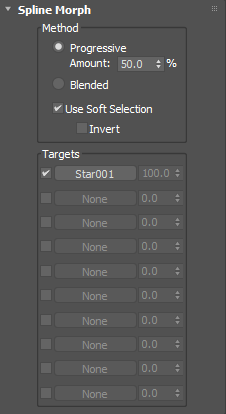
Spline Morph rollout
Show Knots
Displays spline knots.
Method group
Progressive
Blends splines progressively using a percentage value.
Amount
Sets how much to progressively blend between the original object and the targets as a percentage of the total number.
Blended
Combines the targets and weighs each one according to the values provided in the Targets group.
Use Soft Selection
Morphs between the targets based on each knot's soft selection value, if available.
Invert
Inverts the soft selection value. If no soft selection is available, this option is ignored.
Targets group
Pick button
Selects a target spline from the scene. Only splines with an identical number of knots may be selected.
Amount
Sets how much to progressively blend between the original object and the targets as a percentage of the total number.