Component Creator and Variant Manager in Max USD
Welcome to Max USD 0.17.8.1 for 3ds Max 2027.3!
Max USD for 3ds Max 2027.3 makes it easier to create USD assets and manage variant sets in one place.
Create USD components
The Component Creator turns selected 3ds Max objects into a USD asset. You can use the default template or set your own JSON file to match your pipeline. The template controls the asset layout, file names, mesh scope, material scope, and payload behavior.
You can also preview the prim hierarchy and the file structure before you export. This helps teams keep a clear, repeatable structure for assets and reduces setup errors.
Manage variants
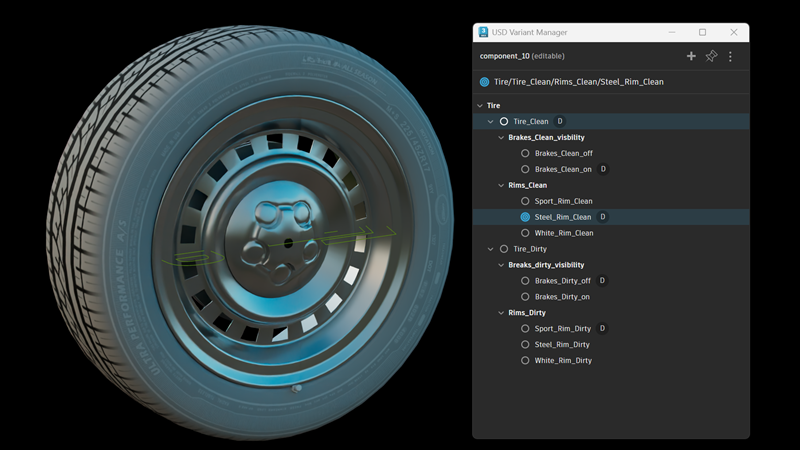
The USD Variant Manager brings variant sets into one view. You can switch variants, add or remove objects, and target a variant for edits. You can also create new variant sets from selected objects or add objects to an existing variant.
This makes it easier to organize stage variations, keep materials and geometry aligned, and work with render, proxy, and guide setups in a more direct way.
What else is new?
| Feature | Description |
|---|---|
| Add Selected Object to Component with Purpose | A Purpose can be assigned to existing USD prims or 3ds Max objects directly within the Variant Editor using the "Add Selected as Purpose" context menu. |
| Improved performance in the USD Explorer | Performance with stages containing large numbers of assets has been improved in the 3ds Max USD Explorer window. |
| Deleting prims from the USD Explorer | Deleting prims is now more intuitive with the ability to delete prims from within the USD Explorer when in Prim Selection mode. |