In this release, several improvements have been made to enhance IFC workflows in the AutoCAD Architecture and MEP toolsets. These improvements include:
- Performance improvement: The time required to import IFC files into the AutoCAD Architecture and MEP toolsets has been significantly reduced, with larger files seeing the most noticeable gains.
- Quality of import: IFC import quality has been enhanced by supporting additional IFC geometry types and improving overall reliability. Known issues—such as empty imports and incorrect geometry—have been addressed and resolved.
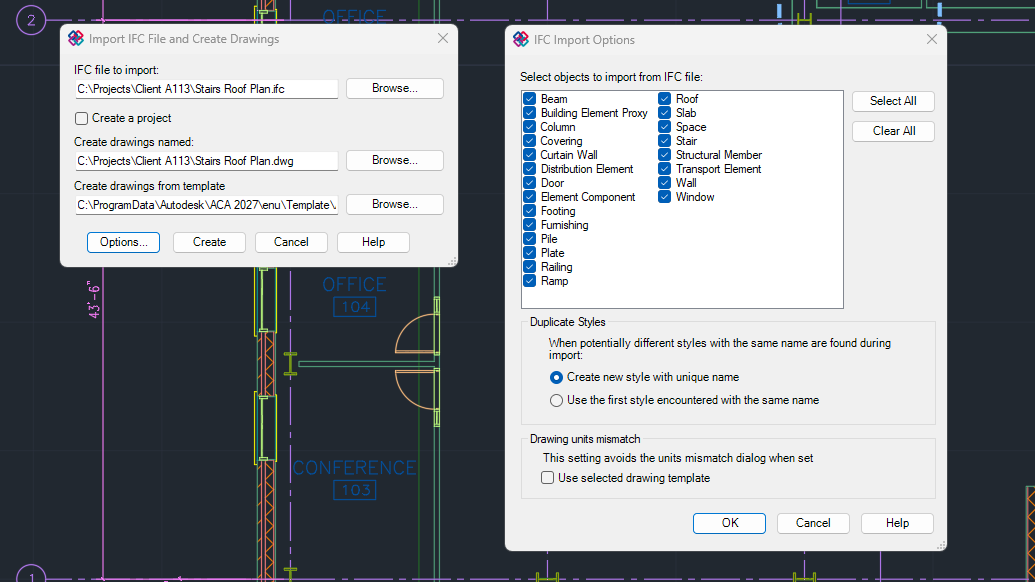
- Improved UI experience: Enhancements have been made to the user experience when reselecting an IFC file for import.
- The text field is now always updated when the selected IFC file changes or when the Create a project checkbox is toggled.
- Additionally, a new option has been added to automatically skip the template selection dialog during the IFC import process when there is a mismatch between the IFC file template and the drawing template.
IFC Tech Preview
The IFC feature includes a Tech Preview designed to improve the export of project and spatial element data.
Important: Exchanging drawings—Do
not exchange files created using this Tech Preview. This Tech Preview should
not be used in a production environment or for editing existing production drawings. To work with IFC exports in production environments, switch back to non–Tech Preview mode.
To switch between IFC exporting technologies, use the AECIFCMODE system variable.
| Value | Description |
|---|---|
| 0 | Reverts to the legacy IFC technology for both importing and exporting. |
| 1 | Turns off the Tech Preview and returns to the default IFC technology for both importing and exporting, which includes improved quality and functionality for importing IFC files. |
| 2 | Turns on the Tech Preview technology, which includes improved functionality for exporting IFC files. The import of an IFC file remains unchanged. |