Importing from an InfoAsset Manager Collection Network
Data can be imported into a InfoWorks network from an InfoAsset Manager collection network within the database or within a Guest Database. You can control how data fields in the collection network are mapped onto the InfoWorks network fields. Default mappings are also available.
To update a network with new data from an asset network
- Open a GeoPlan Window of the InfoWorks network to be updated.
- Load a
Background Network into the GeoPlan:
- Drag in the Collection Network containing the data to be imported from the Explorer Window of the current database or from the Explorer Window of a Guest Database.
- To select a previously committed version of the Collection Network, select Background Network from the Network menu to display the
Background Network Dialog. Click the version
 button to display the commit history for the network, select the version required and click OK.
- Choose Import
 Update from collection network from the Network menu. This displays the
Choose Objects Dialog.
Update from collection network from the Network menu. This displays the
Choose Objects Dialog.
- Select the data source type options from the Choose Objects Dialog and click OK. The Update from Collection Network Dialog is displayed.
- Click the Advanced Options button to display the
Import from Collection Network Dialog
- On the
Update Page, choose whether to import flags from the collection network, or to set your own default flag on the imported data. You can also limit updates to only affect data that has a specific flag. See the Import Flags Rules section below for details on rules used for copying flags when the Import Flags option is selected.
Tip: It is recommended that you do not import flags from the InfoAsset Manager network, but allow the updater to set the #A (asset) flag on fields that are modified. Subsequent updates can then be set to allow modification of fields with the #A flag only. This allows the modeller to control which fields should be updated in future by changing the flag.
- On the Mappings Page, set how various fields from the collection network translate into valid network values. Also choose how to deal with unrecognised values
- On the
Update Page, choose whether to import flags from the collection network, or to set your own default flag on the imported data. You can also limit updates to only affect data that has a specific flag. See the Import Flags Rules section below for details on rules used for copying flags when the Import Flags option is selected.
- Click OK to continue.
InfoWorks ICM will now import the data from the currently loaded version of the collection network and update the current network. InfoWorks ICM finally displays a log of the update process.
Import Flags Rules
When using the Import Flags option when updating an InfoWorks network from a collection network, the InfoWorks network flags are set according to the following rules:
- If a collection network field is copied directly to an InfoWorks network field (e.g. taking off reference), the collection network flag will also be copied to theInfoWorks network flag field.
- If a collection network field is mapped to an
InfoWorks network field (e.g. pipe material), the
InfoWorks network flags will be set depending on the options selected in the
Mappings Page of the
Import from Collection Network Dialog:
- If the mapping is correct, the collection network flag will be copied to the InfoWorks network flag field
- If the mapping fails and the Leave unrecognised value as it is option has been selected, the collection network flag will be copied to the InfoWorks network flag field
- If the mapping fails and the Substitute this default value option has been selected, the InfoWorks network flag will be set to #A
- If the collection network fields are combined (e.g. shaft dimension and shaft dimension 2 are used to calculate
InfoWorks network shaft area):
- If both collection network field flags are the same, the collection network flag will be copied to the InfoWorks network flag field
- If the collection network fields have different flags, the InfoWorks network flag will be set to #A
Notes on importing network objects from InfoAsset Manager data
The table below includes details of the import of InfoAsset Manager network objects to InfoWorks network objects:
| InfoAsset Manager Object Type | Import Details | ||||||||||||||||||||||||||||
|---|---|---|---|---|---|---|---|---|---|---|---|---|---|---|---|---|---|---|---|---|---|---|---|---|---|---|---|---|---|
| Assets (Nodes) |
|
||||||||||||||||||||||||||||
| Assets (Links) |
|
||||||||||||||||||||||||||||
| Assets (Areas) |
There is only one asset area type that is imported: the InfoAsset Manager Storage Area object is imported as an InfoWorks network Node of Node type Storage. |
||||||||||||||||||||||||||||
| Assets (Points) | InfoAsset Manager asset point objects are not imported | ||||||||||||||||||||||||||||
| Line | InfoAsset Manager line objects are not imported. | ||||||||||||||||||||||||||||
| Zones | InfoAsset Managerzone objects are not imported | ||||||||||||||||||||||||||||
| Surveys | There is only one survey type that is imported: the InfoAsset Manager Cross Section Survey object is imported as an InfoWorks network Cross Section Line. | ||||||||||||||||||||||||||||
| Repairs | InfoAsset Manager repair objects are not imported | ||||||||||||||||||||||||||||
| Incident | InfoAsset Manager incident objects are not imported. |
|
InfoAsset Manager Asset |
InfoWorks ICM Object |
|---|---|
| Pipe | Conduit |
| Connection Pipe | Not imported |
| Node |
Node Node type is determined by the settings in the Mappings tab of the Import from Collection Network Dialog. |
| Connection Node | Node of Node type Break |
| Outlet Node | Node of Node type Outfall |
| Storage Area | Node of Node type Storage |
| Flume | Flume |
| Orifice | Orifice |
| Screen | Screen |
| Pump | Pump |
| Siphon | Siphon |
| Sluice | Sluice |
| Valve | Flap Valve |
| Vortex | User Control of Link type Vortex |
| Weir | Weir |
Notes on updating InfoWorks networks from InfoAsset Manager data
The table below includes details of some special update scenario cases:
|
Case |
Action carried out in Collection Network |
InfoWorks Network Update from Collection Network |
|---|---|---|
|
Merged Pipes |
- |
Any areas of theInfoWorks network that have been merged will not be updated. |
|
Pruned Objects |
- |
Any areas of the InfoWorks network that have been pruned will not be updated. |
| Renamed Objects | US Node renamed |
Node and downstream link renamed |
| Renamed Objects | DS Node renamed | Node renamed. DS Node ID field of upstream pipe updated. |
| Lateral Creation |
Lateral nodes and links created |
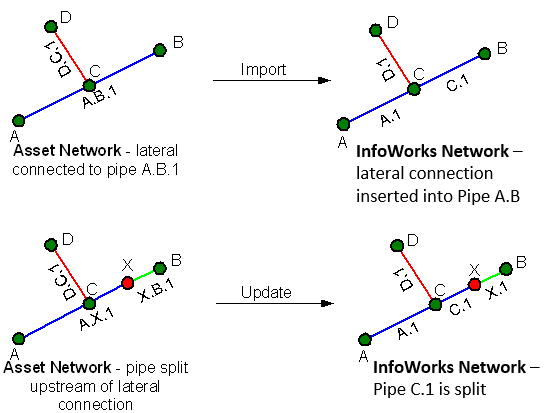
The pipe to which the lateral is connected (in the asset network) is split in the InfoWorks network creating a new pipe downstream of the lateral. |
| Lateral Deletion |
Lateral nodes and links deleted |
Lateral nodes and links deleted in the asset network are deleted from the InfoWorks network. The pipes that were connected to the lateral node are joined and the properties from the pipe upstream of the lateral are used. |
| Pipe Splitting |
Pipe split downstream from a lateral |
A new pipe is created downstream from the lateral. Example
|
| Pipe Splitting |
Pipe split upstream from a lateral |
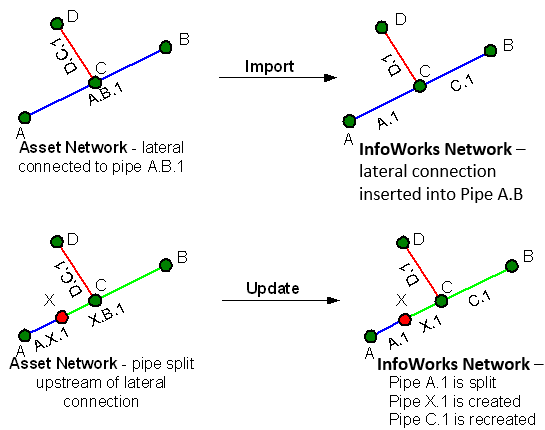
A new pipe is created between the inserted node and the lateral. The new pipe and the pipe downstream from the lateral will be updated with the properties of the newly created pipe in the asset network. Example
|