Data in the [MOUSE_PASSIVE_CONTROL] group of the UND file is imported into the InfoWorks ICM Flap Valve, Pump and User Control tables. This topic contains details on the conversion of MOUSE passive control information to InfoWorks ICM.
Passive Control Group - [MOUSE_PASSIVE_CONTROL]
The MOUSE Passive Control group contains information on:
- Passive flow regulation
- Emptying Storage Nodes
- Q-H relations in outflow nodes
The following tables contain details on the conversion of MOUSE Passive Flow Regulation and QH Outlets to InfoWorks ICM.
The conversion of MOUSE Emptying Storage Nodes to InfoWorks ICM is not supported.
Passive Flow Regulation
|
MOUSE |
Description |
InfoWorks ICM Data Field |
||||||||||||||||||||
|---|---|---|---|---|---|---|---|---|---|---|---|---|---|---|---|---|---|---|---|---|---|---|
|
LINKID |
Link Name |
Used to determine the link at which the flow regulation is to be applied. |
||||||||||||||||||||
|
TYPENO |
Type of flow regulation:
|
Exported to InfoWorks ICM as follows:
See Notes on Import of Passive Controls below. |
||||||||||||||||||||
|
CONTROLNODEA |
Node ID for control node A |
Assumed to be upstream node. A warning is displayed in the import log if this is not the upstream node. |
||||||||||||||||||||
|
CONTROLNODEB |
Node ID for control node B |
Assumed to be downstream node. A warning is displayed in the import log if this is not the downstream node. |
||||||||||||||||||||
|
DATASETID |
Dataset name identifying the HQ or dHQ head-discharge table. Curve is defined in the TABULAR DATA section. |
Used to determine Limiting Discharge value for MOUSE flow regulation types 2, 3 and 4. If flow is varying, also used to determine Minimum Discharge and Maximum Discharge values. See Notes on Import of Passive Controls below. |
Notes on Import of Passive Controls
Passive controls in MOUSE are defined for a given link. In InfoWorks ICM, this link is removed and replaced with the passive control.
MOUSE Flow Regulation Type 1
The MOUSE non return valve (TypeNo = 1) is imported as an InfoWorks ICM Flap Valve.
MOUSE only provides the from and to node parameters for the valve. The InfoWorks ICM flap valve requires an invert level, diameter and discharge coefficient.
- The invert level and diameter are obtained from the conduit to which the MOUSE non return valve is assigned:
- InfoWorks ICM Invert Level imported from MOUSE link upstream invert level
- InfoWorks ICM Diameter imported from MOUSE link width
- The Discharge Coefficient is calculated as described in Calculation of Coefficient of Discharge for Weirs.
MOUSE Flow Regulation Type 2 3, and 4
The MOUSE Passive Controls of TypeNo 2, 3 and 4 are imported as an InfoWorks ICM Orifice.
- The invert level and diameter are obtained from the conduit to which the MOUSE control is assigned.
- InfoWorks ICM Invert Level imported from MOUSE link upstream invert level
- InfoWorks ICM Diameter imported from MOUSE link width
- The Discharge Coefficient is calculated as described in Calculation of Coefficient of Discharge for Weirs.
- The MOUSE Passive Controls have a head discharge table associated with them. The head discharge table is used to determine the orifice type and discharge values:
- If the MOUSE head discharge table contains constant flow values, the InfoWorks ICM orifice Link Type is set to Orific and the Limiting Discharge is set to the flow value in the head discharge table.
- If the MOUSE head discharge table contains varying flow values, the InfoWorks orifice Link Type is set to VLDorf. The Limiting Discharge is set to the first flow value in the head discharge table. The Minimum Discharge is set to the minimum flow value in the table and the Maximum Discharge to the maximum flow value in the table.
In MOUSE the Type 2 Passive Control does not allow reverse flow. A reverse flow will be allowed by the InfoWorks ICM orifice. A warning to this effect will be displayed in the import log.
For Passive Controls with varying flows, Positive change in flow and Negative change in flow values will have to be defined by the user. RTC Control may also be required. Messages will be displayed in the import log.
Q-H Relations in Outlets
|
MOUSE |
Description |
InfoWorks ICM Data Field |
|---|---|---|
|
NODEID |
Node name |
Used to determine the node at which the QH relation is to be applied. |
|
DATASETID |
Dataset name identifying the QH relation. Curve is defined in the TABULAR DATA section. |
A Head Discharge Table is created with a name based on the Node ID. Values to be imported into the head array and discharge array in the Head Discharge Table are determined from curve data in the MOUSE TABULAR DATA section. See Note on importing MOUSE QH Outlets below. |
Note on importing MOUSE QH Outlets
In MOUSE, a QH relationship can be defined at an outlet to describe conditions at the outlet if the outlet is partially or fully submerged.
A MOUSE outlet node with a defined QH relationship is imported to InfoWorks ICM as a series of manhole (Flood Type = 'Sealed'), compound weir and outfall objects:
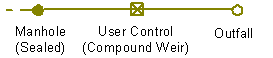
The MOUSE QH curve is used to determine the InfoWorks ICM compound weir Initial Level value and the values to be imported into the InfoWorks ICM Head Discharge Table.
- The QH relation specified in MOUSE is specified in levels above datum (m AD) versus flows. This is normalised in InfoWorks ICM to level (m) versus flows by subtracting the first level from all the other levels.
- The normalised head / discharge array is imported into the InfoWorks ICM Head Discharge Table.
- The imported Head Discharge Table is assigned to the compound weir.
- The first level in the MOUSE QH curve is assigned to the InfoWorks ICM compound weir Initial Level field