
A 2D line connect object represents a flow exchange boundary. It lets you associate a Connect 2D node to the multiple 2D triangles in a 2D mesh that intersect the line. The 2D triangles are used in the calculation of the flow exchange between the 2D surface and the associated node.
2D line connect objects can be imported via the Open Data Import Centre or digitised directly on the GeoPlan Window. Their properties can be edited in the 2D line connect Grid Window of the Lines Grid or the 2D line connect Property Sheet.
To associate a Connect 2D node with a 2D line connect object, ensure that the node's Node type is set to 2D, its Connection type is set to 2D line, and that the relevant 2D line connect object is selected in the 2D connect line property. A 2D line connect object that has been associated with a Connect 2D node is represented on the GeoPlan by a dashed green line (part of the 2D line connect default theme) between the centre of the 2D line connect object and the Connect 2D node. This is shown in the Example of 2D element selection below.
Meshing
The 2D line connect object can be located anywhere in the same 2D zone as the associated node, and when the 2D zone is meshed, the 2D line connect object is intersected by the 2D mesh, and an intersection length is assigned to each intersected 2D triangle.
Flow exchange
Selection of the 2D triangles to be included in the flow exchange calculation is determined by the direction of the two last vertices of the conduit that is connected to the Connect 2D node. For example, if the direction of the last two vertices of the conduit is east to west, as shown in the following example, then only the 2D triangles on the west side of the 2D line connect object are selected for use in the calculation.
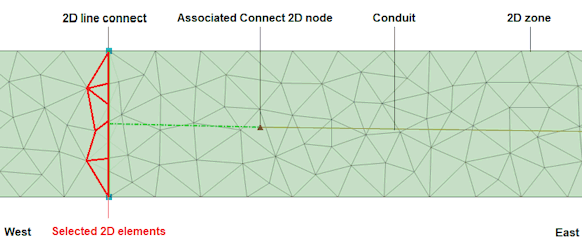
Example of 2D element selection
When you run a simulation, the simulation engine uses the list of 2D triangles and intersected lengths, provided by the 2D line connect object, to calculate a compound flow between the 2D surface and the Connect 2D node associated with the 2D line connect object.
The flow calculation is based on the properties of the conduit connected to the Connect 2D node and the hydraulic variables on the 2D triangles provided by the 2D line connect object. For each 2D triangle / conduit pairing, a flow calculation is performed by the simulation engine. This flow calculation is then weighted by the intersection length ratio and exchanged with the parent 2D element. The flow at the conduit edge is the aggregation of the flows for all the 2D triangle / conduit pairs.
The following equation is used for the flow exchange calculation:
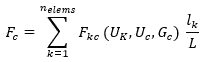
where:
Fc = conduit flow (m3/s)
Fkc = 2D element k - conduit flow (m3/s)
Uk = hydraulic properties of 2D element k
Uc = hydraulic properties of the conduit
Gc = geometric properties of the conduit
lk = length associated with 2D element k (m)
L = total length associated with the 2D line connect object (m)
nelems = number of elements associated with the 2D line connect object (m)