ICMLive functionality is only available if the ICMLive option is enabled on your licence.
This page of a manifest is used to specify a default run, an alert definition list and run parameters.
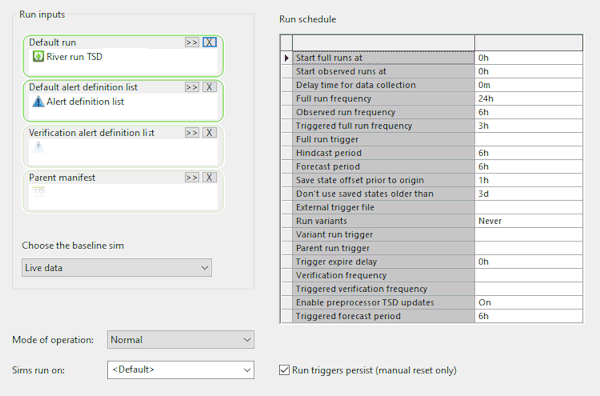
Page description
|
Field |
Description |
||||||||||||||||||||||||||||||||||||||||||
|---|---|---|---|---|---|---|---|---|---|---|---|---|---|---|---|---|---|---|---|---|---|---|---|---|---|---|---|---|---|---|---|---|---|---|---|---|---|---|---|---|---|---|---|
|
Default run |
The default run may contain multiple simulations. |
||||||||||||||||||||||||||||||||||||||||||
|
Default alert definition list |
The list of alerts, as specified in an alert definition list, that are to be used for a run. |
||||||||||||||||||||||||||||||||||||||||||
|
Verification alert definition list |
The list of alerts, as specified in an alert definition list, that to be used for verification of a run. |
||||||||||||||||||||||||||||||||||||||||||
| Parent manifest |
The manifest that is to act as a parent. Use in conjunction with the Parent run trigger to trigger full runs in the current 'child' manifest when an alert occurs in the parent run. See Alert Triggered Runs for further information. |
||||||||||||||||||||||||||||||||||||||||||
| Choose the baseline sim |
Dropdown of all simulations included in the Default run. Select the simulation to be used as the baseline simulation. The baseline sim is used for all full runs and observed runs. Other simulations associated with the default run may be run as variant simulations when triggered by an alert. |
||||||||||||||||||||||||||||||||||||||||||
|
Run schedule |
Run schedule parameters:
|
||||||||||||||||||||||||||||||||||||||||||
| Run triggers persist (manual reset only) |
Indicates whether or not the run frequency is returned to the normal full-run frequency manually. If checked (default), the run frequency can only be changed manually by the user. If unchecked, then the run frequency returns to normal automatically, after the time specified by the Trigger expire delay field. |
||||||||||||||||||||||||||||||||||||||||||
|
Mode of operation |
The following modes are available: Normal - Manifest schedule to run as specified. Manual runs only - Runs can only be generated manually by the user in ICMLive Operator Client (these runs can be full runs or observed runs). Ignore alert triggers - Alert triggers will be ignored. Users may wish to select this option if there is a spurious alert that keeps triggering full model runs unnecessarily. Tip: Changing the mode of operation of existing manifests may be
permissioned and therefore this field will be read-only to users who have not been granted appropriate rights.
|
||||||||||||||||||||||||||||||||||||||||||
| Sims run on |
Supports the running of automatic simulations and alerts on a specified device. A dropdown of the system device options:
Alternatively, you can overwrite the above options to define any device to be used as the runon device for the manifest. A device may be either a computer name or group name defined by the sim agent coordinator. When this type of device is configured, the Live Server will instruct its local sim agent to schedule, via the coordinator, the simulation or alert to run only on the device specified here. |
- In any of the Run Schedule fields, for which there is a default value, and the current value is removed (deleted or cut) by the user, then InfoWorks ICM automatically sets the blank field to 0h. This is to prevent InfoWorks ICM from automatically overwriting the field with the default value when the manifest is saved.
- In the Run Schedule section, times and time periods should be specified using d, h and m for days, hours and minutes e.g. start full runs at 09:00 would be specified as 9h. Delay time for data collection of 15 minutes would be specified as 15m.
Alert triggers expiry time
The manifest includes a Trigger expire delay parameter which allows you to specify the number of minutes after a run has been triggered, for that trigger to expire, and for the run to return to its normal run schedule.
After a run, InfoWorks ICM checks the manifest to see if any alert categories are set as triggers (full, variant and parent). For each category, it finds the latest alert end time in that category and adds the Trigger expire delay to that time in order to calculate the time at which the alert could expire (become inactive and run frequency to return to the normal run schedule).
If one of the triggers occurs, then the following information is recorded in the appropriate manifest :
- a run has been triggered
- when it will expire
- the run ID that triggered it
- run ID of the last run to update the trigger expire time
If the manifest is already triggered, then the new expiry time is compared to that already in the manifest. If it is later, then the time is updated (it is never brought forward) and the run ID that updated the expire time recorded.
If the run origin is after the expiry time for a trigger, then it is reset, and the run frequency returns to a lower state.
- The variant triggered state is higher than the full run trigger state. If the variant trigger expires but the full run trigger is set, then the new state will be triggered full frequency but without variants. If the manifest has its variant trigger set, the setting and resetting of the full run trigger will make no difference.
- If any of the children included in a manifest in a current run have a parent trigger configured, and this has occurred in the run, then the child’s full run trigger will be set or updated. A parent will only reset a child’s full run trigger if the child has a parent trigger configured but not a full run trigger. If the child has a full run trigger configured, then the run of the child will determine when that expires.