This topic covers the most common reasons why you might not be seeing any projects in Autodesk Projects.
When you open the Start tab in the Autodesk Projects section and don't see a hub or project interface, you may need to install Desktop Connector.
There will be a message that should inform you to download Desktop Connector.
How do I check if Desktop Connector is installed?
Open the list of installed programs on your computer.
-
Right-click the Windows Start button and open Installed apps.
-
Look for Desktop Connector in the list.
If you do not see it, then install Desktop Connector.
Also, check if Desktop Connector is running
-
Open the Windows system tray.
-
Look for the Desktop Connector icon
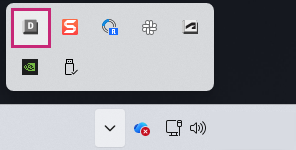
If the Desktop Connector icon is not displayed in the Windows System Tray, then check if Desktop Connector is installed.