This method allows you to merge drainage network data from a source phase (either from the same model file or an external *.iddx file) into an existing target phase.
An automatic phase type conversion is implemented during import. A storm phase is converted into a sanitary phase when importing into a sanitary phase. A sanitary phase is converted into a storm phase when importing into a storm phase.
Networks elements such as Junctions, Stormwater Controls (SWCs), Connections, Inflows, Land use, and Soil types are imported to the target phase. Pollutants, Part Families, and Civil 3D Parts Mappings have shared data merging.
Upon import, all existing analysis results are cleared and outfall details are updated.
All newly imported items are selected in Plan View. Layers for imported item types are automatically made visible.
To import into a phase using the tree view:
- Right-click a specific phase under
Phase Management in the Tree view and then select
Import Into Phase.
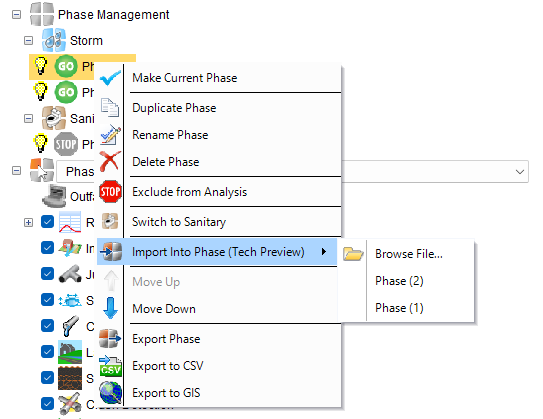
- Select the source phase to import:
- From an external file:
- Select Browse file.
- Locate the file (*.iddx) that you want to import and then click Open.
- If the selected file contains multiple phases, a phase picker dialog appears.
- In the Import Into Phase dialog, select one phase to import.
Note: You can only select one phase at a time.
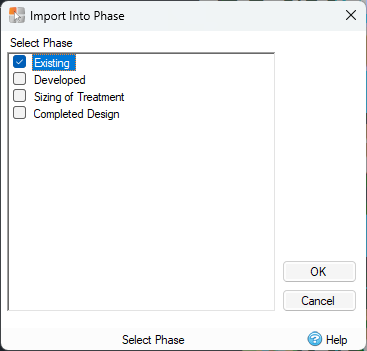
- Click OK and the phase will be imported into your model.
- From the same model file:
- Select a phase to import from the list of available phases in the current model file.
- From an external file:
Duplicate Detection
Two nodes (Junctions, SWCs, Inflows, Land Use, Soil Types) are considered duplicates when they are at the same location (within 0.001 m tolerance). A connection is considered a duplicate when both endpoints are duplicate nodes, and a connection already exists between the corresponding target nodes.
When these duplicates are detected, a dialog prompts with three options:
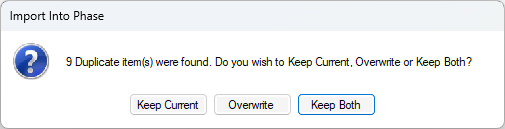
Keep Current
- Existing target items remain unchanged.
- Duplicate imported items are not created.
- New (non-duplicate) items are imported.
- Imported connections automatically connect to existing target nodes.
Overwrite
- Existing target items are removed.
- Imported items replace them with new GUIDs.
- Flow Path references are updated to point to new GUIDs.
- Connected elements (inlets/outlets) are updated.
Keep Both
- Both existing and imported items are retained.
- Imported items receive unique names (auto-generated).
- All items get new GUIDs.
Error Messages
- Source phase not found - Invalid source phase GUID.
- Some Land Use / Soil Type polygons intersected with existing items and have not been imported - Polygon overlap warning.