Best Practices for AnyCAD Revit
Learn about the recommended way to successfully import Revit models in Inventor.
For general AEC interoperability concepts, supported Revit versions, and import or export limits, see About AEC Interoperability for Inventor and Revit.
What's New: 2021
Minimize the Number of Elements to be Imported
Revit files can be very large. You will probably not want to import an entire building! Instead, you should import only the Revit elements that other Inventor components depend-upon, and perhaps a few other elements for visual context. "Depend-upon" means you are referring to that element from a new Inventor component that you are making, for example, projecting the element's geometry into a sketch of the new component. Or, constraining a new component to a face of the imported Revit element. It's likely that there will be very few of these elements, relative to the total number of elements in the building.
How to Minimize the Number of Elements
You control the number of elements by selecting an appropriate Revit 3D view during the import process.
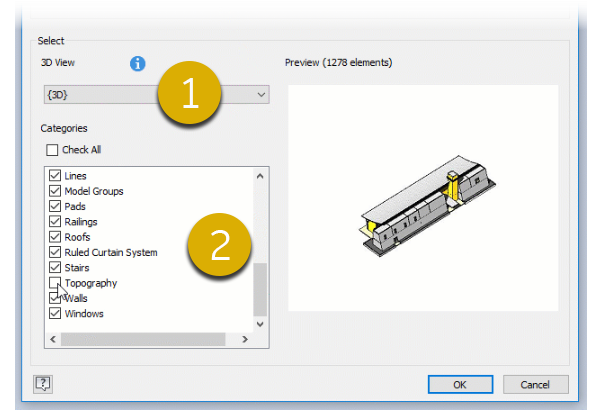
- Revit 3D views are created by the Revit user to satisfy viewing requirements and needs. They cannot be defined or have their definition modified from within Inventor. You choose which view to import from the available views. Only visible elements are imported.
- Once the view is selected, you can further refine what is imported using the Category chooser. Select only the categories you require as references. The Inventor Import dialog displays the number of visible elements for the selected view but this number provides only a rough idea as to whether or not this will be small or large in Inventor.
A suggestion
Take time with the Revit user to discuss your project or design to determine the smallest number of elements required for you to complete your design. Typically, you would have elements with direct interfaces to your design and possibly a few other elements for viewing context.
Important things to remember
Here are some points to remember when having a discussion with the Revit data supplier:
- For the best performance Revit files should be upgraded to the latest Revit version
- Revit 3D Views must be defined in advance, in Revit
- Inventor only imports visible Revit elements
- Describe the purpose of your design, the Revit user may be able to advise you about orientation and conflicting elements
- Help define the data you require for your design to interface with the Revit data, such as mounting location, orientation in the building, access to systems such as electrical, plumbing, and HVAC
- Have the 3D view named so you can easily find it in the list