Utility Clauses
The <utility_body> of a scripted utility definition is composed of a sequence of utility clauses as follows:
<utility_body> ::= { <utility_clause> }+where
<utility_clause> ::= <rollout_clause> | <nested_rollout>A <utility_clause> can contain one or more instances of <rollout_clause> or <nested_rollout> . A nested rollout is basically another self-contained rollout definition which can be used to construct scripted utilities with multiple rollouts or populate rollout floater windows that may be associated with the utility. A <nested_rollout> is defined as follows:
rollout <var_name> <description_string> [ rolledUp:<boolean> ] [ silentErrors:<boolean> ] \
  [ autoLayoutOnResize:<boolean> ]
(
<rollout_body>
)
where
<rollout_body> ::= { <utility_clause> }+In other words, a rollout definition is identical to a utility definition except its description string is not displayed in the Utilities list in the MAXScript rollout. In fact, a utility can just be considered a special case of a rollout, and both are instances of the Rollout class.
As an example, consider the following script. In this script, line 1 defines the start of the utility, and the utility body is lines 2 through 42. The following line ranges are utility clauses: 3 (a rollout clause), 5 to 9 (a nested rollout), 11 to 30 (a nested rollout), 32 to 35 (a rollout clause), and 37 to 40 (a rollout clause).
SCRIPT
   utility MyUtil "My Utility"
   (
       local pot
       rollout bout "About My Utility"
       (
           button aboutMU "About" width:45 height:20
           on aboutMU pressed do
               messagebox "My First Utility\nby ME\nVersion .1"\
           title:"About My Utility"
       ) -- end rollout bout
       rollout creator "The Teapot"
       (
           group "Object Creator"
           (
               button tea "Teapot"
               spinner rad "Radius" range:[10,50,20] type:#integer
               spinner seg "Segments" range:[4,32,12] type:#integer scale:1
           )
           on tea pressed do
           (
               pot=teapot radius:rad.value
               pot.name="TestPot"
               pot.segs=seg.value
           ) -- end on tea pressed
           on rad changed value do
               pot.radius=value
           on seg changed value do
               pot.segs=seg.value
       ) -- end rollout creator
       on MyUtil open do
       (
           addRollout bout
           addRollout creator
       ) -- end on MyUtil open
       on MyUtil close do
       (
           removeRollout bout
           removeRollout creator
       ) -- end on MyUtil close
   ) -- end utility MyUtil
The Utilities panel rollouts created by the previous script look like the following:
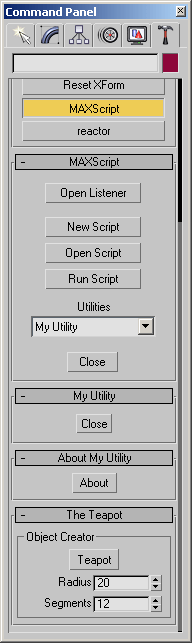
Multiple rollouts defined in a utility
You can also define rollouts outside utility definitions when you want to add them to a rollout floater window that may not be associated with a scripted utility. This is described more fully in Rollout Floater Windows.
A value is created for a utility or rollout when the script defining the utility or rollout is executed. In general, the lifetime of a utility value is the entire 3ds Max session, unless a new utility with the same name is executed. The lifetime of a rollout defined in a utility is the lifetime of the utility value. The lifetime of a rollout defined outside a utility is the lifetime of the context the rollout was defined in. For more information, see Scope of Variables.