Report Window
The Report window enables you to set up and write reports containing details of all clash results found in the selected test.
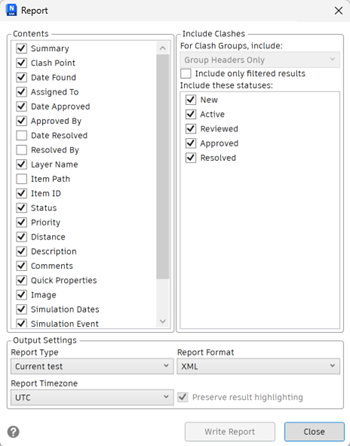
Contents Area
Select the required check boxes to specify which clash-related data to include in your report.
For example, you can include Quick Properties relating to the items involved in the clash, TimeLiner task information, image of the clash and so on.
Include Clashes Area
For Clash Groups, Include
Use the options in this area to specify how to display the clash groups in your report. Choose from the following options:
- Group Headers Only - reports will include summaries of clash groups and individual clashes not in groups.
- Individual Clashes Only - reports will only contain individual clash results, and will not distinguish those results that have been grouped. For each clash that belongs to a group, an extra field, called Clash Group, can be added to the report to identify it. To enable this functionality, select the Clash Group check box in the Contents area.
- Everything - reports will contain both summaries of clash groups that you have created, clash results that are part of each group, and individual clash results. For each clash that belongs to a group, an extra field, called Clash Group, can be added to the report to identify it. To enable this functionality, select the Clash Group check box in the Contents area.
- Include only filtered results - reports will include only the clashes remaining after any filters that have been applied.
Include These Statuses
Select the check boxes in this field to specify which clash statuses to include in your report.
Output Settings Area
Report Type
Select the type of report from the drop-down list:
- Current Test - creates a single report for the current test only.
- All Tests (Combined) - creates a single report for all tests.
- All Tests (Separate) - creates a separate report for each test.
Report Format
Select the format of the report from the drop-down list:
- XML - creates an XML file.
- HTML - creates an HTML file with clashes listed sequentially.
- HTML (Tabular) - creates an HTML (tabular) file with the clash test(s) displayed as a table. This report can be opened and edited in Microsoft Excel 2007 onwards.
- Text - creates a TXT file.
- As Viewpoints - creates a folder called [Test_Name] on the Saved Viewpoints dockable window (this window is automatically displayed when the report is run); it contains each clash saved as a viewpoint with an attached comment describing the clash.
- Preserve result highlighting - this is available with Viewpoints report only. Checking this box will maintain the transparency and highlighting for each viewpoint. You can adjust highlighting in the Results tab and the Options Editor.
- By default, Clash Detective attempts to include a JPEG viewpoint image for each clash. Make sure to select the Image check box in the Contents box, otherwise the report will contain broken image links.
- For clash groups, the viewpoint image is the aggregate viewpoint for the group.
- You need to create a separate folder for the report and its viewpoint images.
Report Timezone
Select the timezone used by the report from the drop-down list:
- UTC - to use coordinated universal time.
- Local - to use the time zone set on your system.
Write Report Button
Creates the selected report and saves it into the selected location.