When selecting instruments or instrument lines, you can now include related instruments in the selection for batch operations, such as moving, removing, or modifying properties simultaneously.
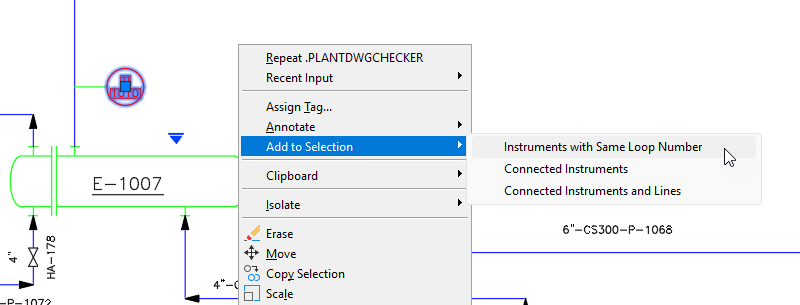
The following describes the conditions under which this selection behavior is available and how it can be used:
- Instruments with the Same Loop Number: All instruments with the same loop number as the selected instrument are added to the selection.
- Connected Instruments: All instruments connected to the selected instrument through an instrument line are added to the selection.
- Connected Instruments and Lines: All instruments and instrument lines connected to the selected instrument are added to the selection.
- Instruments: Right-click selected instruments in a P&ID drawing and choose Add to Selection from the shortcut menu.
- Instrument Lines: Right-click selected instrument lines in a P&ID drawing and choose Add to Selection from the shortcut menu. Then choose Connected Instruments and Lines to add all connected instruments and instrument lines to the selection.