Specifies advanced Iso creation options.
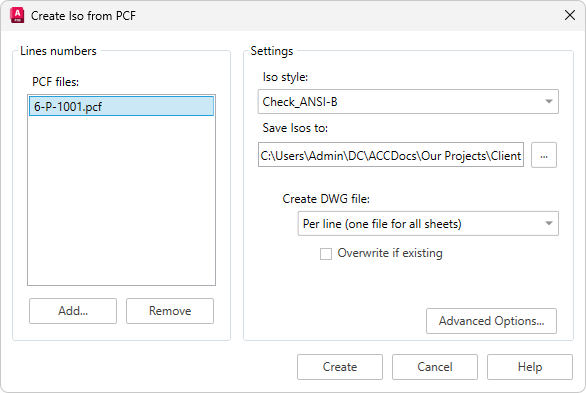
Line Numbers
- PCF Files
- Specifies the PCF files to import.
- Add
- Adds one or more PCF files to the list.
- Remove
- Removes one or more PCF files from the list.
Settings
Specifies isometric output settings:
- Iso Style
-
Specifies the Iso Style to use. You can create and modify Iso Styles in Project Setup.
- Save Isos To
-
Specifies the folder where isometric drawings are created.
- Revision Number
-
Sets the revision number which can display in the title block.
- Create DWG file
-
Specifies whether all Iso sheets for the same line number are generated in a single Iso drawing file or a separate Iso drawing is created per sheet.
- Overwrite if Existing
-
Specifies whether to overwrite previously generated files.
- Advanced Options
-
Displays the Advanced Iso Creation Options dialog box.