You can create and host a wall on another wall. The existing wall is called the Host Wall and the newly created wall is called the Hosted Wall. The Hosted Wall will follow the movement, rotation, and cross-section of the Host Wall in editing operations
 Video: Create and Modify Hosted Walls
Create Hosted Walls
- Click Architecture tab
 Build panel
 (Wall).
- Click Modify | Place Wall tab Draw panel
 (Place By Segment) or
 (Place By Room).
- Click Modify | Place Wall tab Constraint panel
 (Hosted Wall).
- To allow doors and windows to penetrate both walls, click Modify | Place Wall tab Constraint panel
 (Auto Join).
After hosting the wall, you can add an offset between the host and hosted wall either by specifying a non-negative value in Offset from Host in the Properties palette or by moving the hosted wall in the canvas.
Doors and windows can penetrate geometry-joined walls when offset is not larger than 6'' (152.4mm).
Hosted walls support an editable Offset from Host, which can be adjusted directly in canvas or set as a non-negative value in the Properties palette. Doors and windows can penetrate joined walls when the offset does not exceed 6 in. (152.4 mm).
You can remove, assign, or reassign a host at any time. Use Select Main Host to identify the controlling wall when multiple hosted walls are present. Hosted walls can also be filtered in views and included in schedules for documentation.
- Certain wall types-such as stacked walls (and sub-walls), elliptical walls, face-based walls, and in-place walls-can act as hosts or hosted walls, while walls created by picking another wall end or a column cannot be hosted.
- Curtain walls cannot be a host wall when creating hosted walls by room/segment, but can be picked as a host wall after creation.
- Structural walls cannot be a host wall when creating hosted walls, but can be picked as a host wall after creation.
- Walls cannot be hosted on walls in linked models.
- If a hosted wall is pinned, it can still move/rotate/update cross-section following the host wall.
- A host wall cannot align to its hosted wall as reference.
Modify Hosted Walls with Host
If you have multiple hosted walls and want to find the host that can drive the movement of all its hosted walls, click Modify | Walls tab Manage Host panel
 (Select Main Host).
Hosted walls will follow the cross-section, movement and rotation of their hosts. Users cannot change the cross-section only for a Hosted Wall.
Remove or Build Hosted Relationship
Hosted relationship can be removed. To remove an existing hosting relationship, select an existing wall and click Modify | Walls tab Manage Host panel
 (Remove Hosted Relationship).
You can re-built it or build a new hosted relationship. Select an existing wall and click Modify | Walls tab Manage Host panel
 (Pick New Host).
Override Hosted Walls
To override hosted walls by View Filter, select Walls Hosted equals Yes.
Schedule Hosted Walls
After filtering the hosted walls, you can create a schedule of them.
Best Practice: Prepare Wall Types for Accurate Wall Joins
Follow this best practice for better default wall joins, so you will not need to edit wall joins after the walls are created.
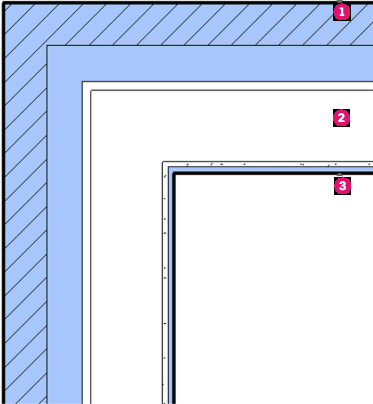
- Create walls by separating the exterior finish wall
 , core wall
 , and interior finish wall
 .
.
Model with 3 separate walls
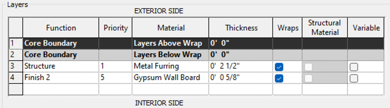
- For core wall types, move all the wall layers inside Core Boundaries, or set the layers outside of Core Boundaries to highest priority (1).
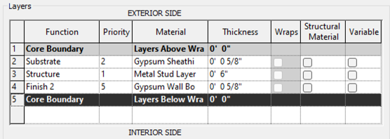
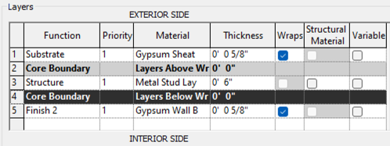
- For exterior finish wall types, move all the wall layers between Core Boundary and Exterior Side, and change Priority to ascend from 1 to 5 from Core Boundary to Exterior Side.
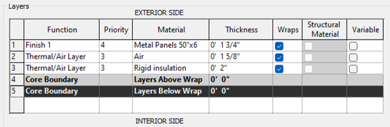
- For interior finish wall types, move all the wall layers between Core Boundary and Interior Side, and change Priority to ascend from 1 to 5 from Core Boundary to Exterior Side.