Starting with the Revit 2026 release, you can control the graphical appearance and objects visibility of the coordination model as follows:
Coordination Model Graphical Appearance Control
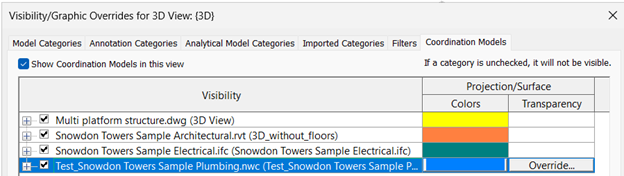
Quickly distinguish between different models at a glance, by assigning a color to each coordination model. Colors can be assigned for coordination model links.
All objects belonging to the linked coordination model are colored. This functionality applies to coordination models linked from Autodesk Docs(.rvt, .dwg, .ifc, .nwc, .axm, etc.) and as well as from local storage when linking Navisworks files.
Coordination Model Objects Visibility Control
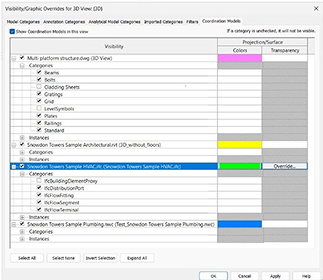
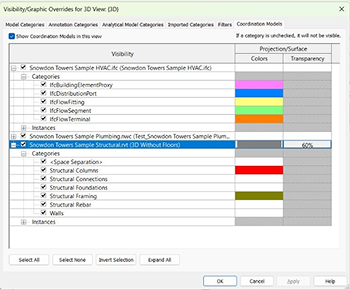
- You can easily manage the visibility of the coordination models categories from the Visibility/Graphic settings. Categories of elements for coordination models linked from Autodesk Docs can be hidden or unhidden. The supported file formats for these categories are RVT, DWG, IFC, and Navisworks files. This functionality applies to coordination models linked from Autodesk Docs.
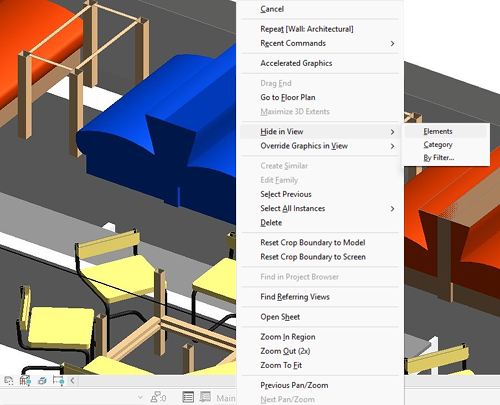
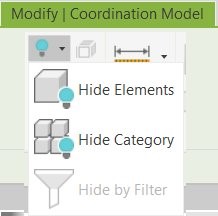
- You can instantly hide or unhide elements or categories of elements using the contextual menu directly in the Revit canvas. Select Hide in View from the right-click menu, then select Elements or Category. Alternatively, you can select Hide Elements or Hide Category from the drop-down menu placed in the Modify | Coordination Model tab. This increases efficiency by displaying only the relevant details and avoiding information overload through selective element visibility. This functionality applies to coordination models linked from Autodesk Docs.
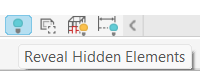
- Use Reveal Hidden Elements to enhance project clarity by revealing hidden coordination model elements and categories. This functionality applies to coordination models linked from Autodesk Docs.
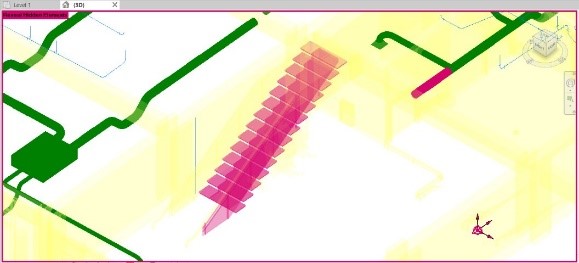
Coordination Model graphical appearance control for categories
You can assign a color to each category of coordination model elements from the Visibility/Graphic settings, for an instant category recognition. This functionality applies to coordination models linked from Autodesk Docs.
Show Option for Coordination Models Enabled
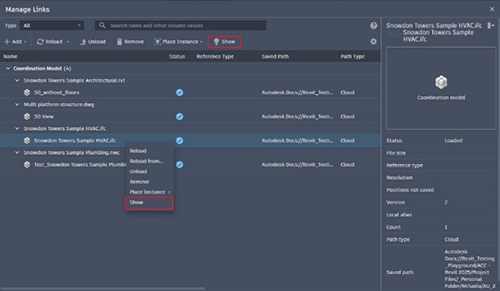
You can locate and view coordination models directly in the Revit canvas using the Show option from the Manage Links dialog. This functionality applies to coordination models linked from Autodesk Docs (.rvt, .dwg, .ifc, .nwc, .axm, etc), as well as from local storage when linking Navisworks files.