Change instance properties for a tag to specify whether it has a leader line, and how the tag is oriented in the view.
| Name | Description |
|---|---|
| Leader Line | Specifies whether the tag has a leader line. The default is for the leader to have an attached end, but you can specify a free end on the contextual tab of the ribbon. |
| Orientation | Specifies whether the tag displays horizontally, vertically, or aligned to model elements. Alternatively, select the tag and press the Spacebar to change the orientation from vertical or horizontal. |
| Angle |
Specifies the angle value at which the tag is rotated counter-clockwise with respect to the horizontal position. Note: When selecting multiple tags, you can use the Angle parameter to bulk-rotate all the selected tags.
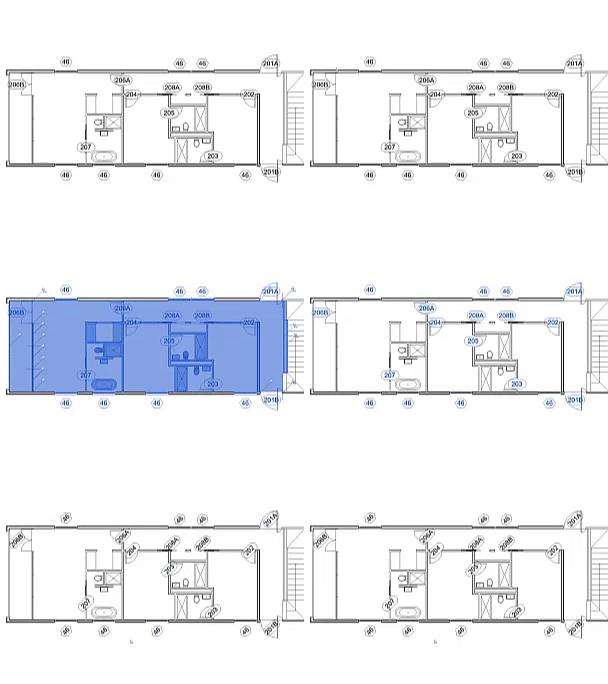 |
| Leader Start | Specifies if the leader start is attached to the tagged element or free to be positioned manually. |
| Leader End | Specifies if the leader end is attached to the tagged element or free to be positioned manually. |
| Host Count | Displays the number of hosts for the selected tag. See Place Tags with Multiple Leaders. |
| Exclude From Leader Outline |
Excludes geometry from the outline used by leaders to determine the start attachment point. The following elements in annotation families support the Exclude From Leader Outline parameter:
Note: Text does not contribute to the leader outline.
When geometry is excluded by setting the Exclude From Leader Outline parameter, the leader start point will automatically be attached to one of the four tag sides using the reduced outline. The result is consistent leader placement, as well as preventing cases where changing the tag type (to one with additional geometry) could cause the leader to shift. The Exclude From Leader Outline parameter also supports association to other Yes/No parameters, which allows you to customize different outlines per family type. |