Stair tread/riser numbering has been enhanced to provide greater control over visibility, appearance, and documentation workflows.
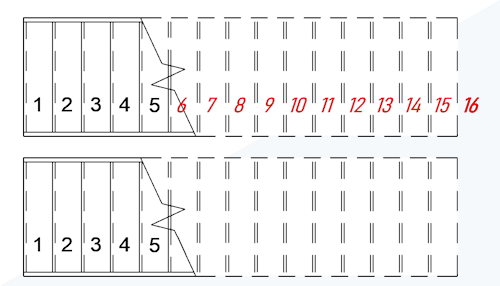
Appearance Control
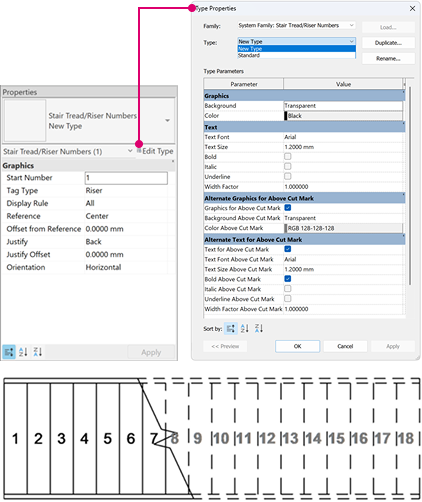
Stair tread/riser numbering elements now include type properties, allowing control over:
- Background and color of numbers
- Font
- Size
- Bold, Italic, and Underline
- Width Factor
The appearance of stair tread/riser numbers can be controlled independently for elements above and below the stair cut line.
Type Properties for Stair Tread/Riser Numbers
Stair Tread/Riser Numbers now support Type Properties, enabling consistent formatting and standardized text styles across a project.
You can create, duplicate, and customize number types to match drawing standards. Type parameters can be configured independently for numbers placed above and below the cut mark, providing greater control over documentation presentation.
This enhancement allows consistent control of stair numbering appearance while maintaining flexibility across views and projects.
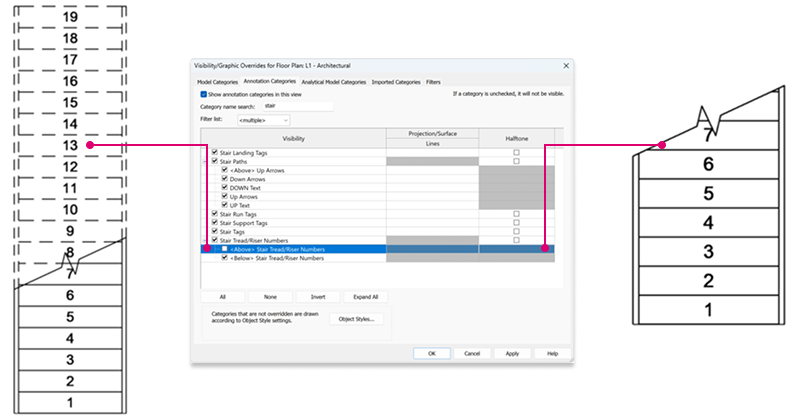
Visibility Control
Stair Numbers and Stair Path in Tag All Not Tagged
The Tag All Not Tagged dialog now supports Stair Path and Stair Tread/Riser Numbers. Annotate all stairs in a view at once, automatically adding missing stair paths and/or numbering using selected tag types and orientation settings.
See Tag All Not Tagged.
 This feature was suggested by customers on the
Ideas forum and is described on the
product road map.
This feature was suggested by customers on the
Ideas forum and is described on the
product road map.