Define complex rebar spacing with a single formula using fixed, variable, or proportional values. Revit automatically places remaining spacing and reports multiple spacings for clearer documentation.
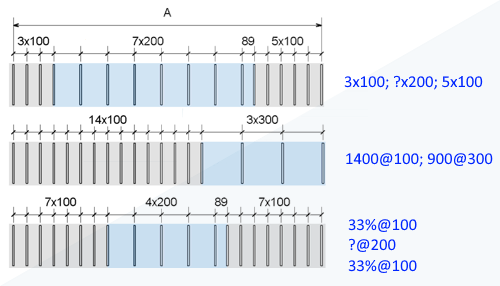
Rebar detailing is improved with formula-based custom spacing for rebar sets. Define multiple spacing patterns in a single set using fixed values, lengths, or percentages.
Use a variable placeholder (?) to maintain exact spacings while automatically placing the remaining length at the end of the set. Spacing formulas are edited in the Properties palette, rebar sets can be flipped to control layout direction, and multiple spacings can be reported using the Spacing Summary parameter in tags and schedules.
Select a rebar set and set the Layout Rule to “Custom” in the Properties Palette, then define the Layout Formula for the set.
See Rebar Set Layouts.
 This feature was suggested by customers on the
Ideas forum and is described on the
product road map.
This feature was suggested by customers on the
Ideas forum and is described on the
product road map.