You now have more control over tag leaders. Both the start and end points of the leader can be set to free and positioned manually. Tag outline geometry is more flexible letting you control and snap leader positions more accurately.
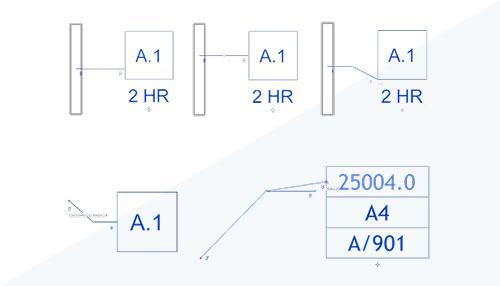
Customize attached leader start location
When creating or editing tag families in the Family Editor, elements making up the tag have a parameter, Exclude From Leader Outline, to exclude them from the tag outline geometry. The tag outline geometry controls where leaders from the tag are automatically positioned. You can exclude geometry to control where the leader is attached to the tag.
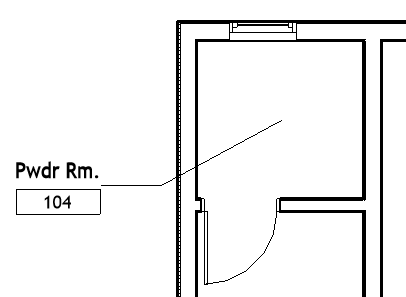 Tag outline includes all geometry. |
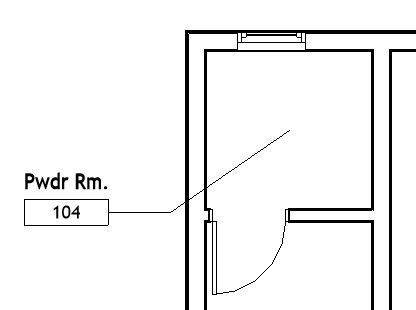 Room name not included in tag outline geometry. |
Leader Start and End Point Placement
The existing leader end parameter, Leader Type, has been renamed to Leader End, with the same options and behavior as previous releases.
When Leader Start is set to Free Start, the leader start can snap to the default four sides of the tag outline. If additional snap candidates are needed, any line in a tag family can be designated as a snap reference by enabling the Leader Snap Reference parameter.
Leader Snapping
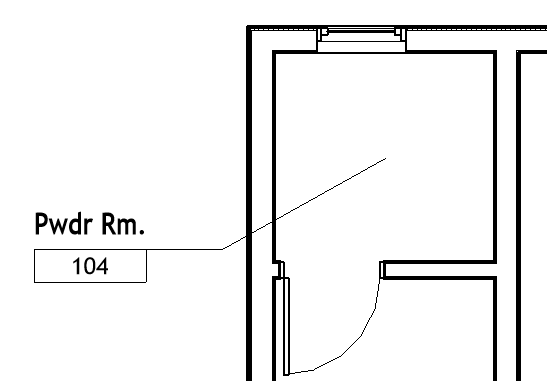
Free end leader snapped to top of number box.
A leader set to Free End can now snap to its host geometry and some related objects.
Snap previews have been improved for tags, and the ability to horizontally/vertically snap to other tag geometry has been expanded.
Leaders set to Free Start or Free End have been integrated with Object Snaps and Overrides.
Revit.ini options are available to customize this functionality. See Annotation Leader Options in Revit.ini.
 This feature was suggested by customers on the Ideas forum (Idea 1,
Idea 2,
Idea 3,
Idea 4) and is described on the
product road map.
This feature was suggested by customers on the Ideas forum (Idea 1,
Idea 2,
Idea 3,
Idea 4) and is described on the
product road map.