HVAC Zones have been upgraded to System-Zones, introducing a revised zoning structure and updated project behavior.
This change modernizes how HVAC zoning is managed while ensuring existing project data is preserved during file upgrades.
Automatic File Upgrade
- Existing HVAC Zones are automatically converted to System-Zones.
- A special type is created to indicate zones that originated as HVAC Zones.
- The upgrade preserves document integrity while adapting zones to the new system structure.
Default HVAC Zone Behavior Changed
In Revit 2026 and earlier:
- A Default HVAC Zone was automatically created in every project.
In Revit 2027:
- A default HVAC Zone is no longer automatically created.
- New projects start without a predefined zone structure.
This change provides cleaner project initialization and avoids unintended default zoning configurations.
Entry Point and Revit.ini Changes
The previous Revit.ini switch used to expose the HVAC Zone entry point has been removed.
Property Changes During Upgrade
- Some properties are not transferred.
- Some properties are newly introduced as part of the System-Zones structure.
- In cases where similar properties exist, values may be overridden to align with the new system architecture.
- Some properties that are transferred might have slightly different names.
These adjustments ensure consistency within the updated zoning model while maintaining project stability.
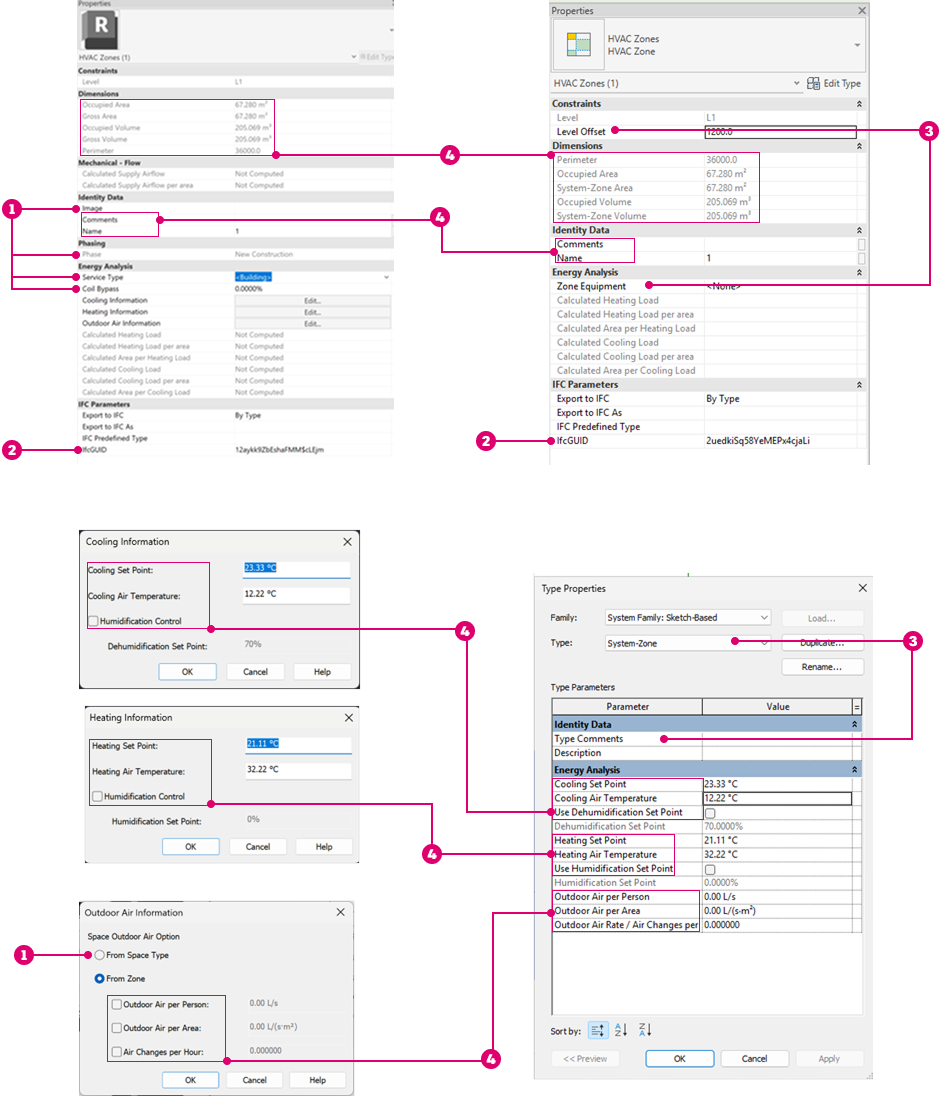
 – Properties that are not transferred
 – The same property exists but the value would be overridden
 – Properties that are new in System-Zones
 – Properties that are transferred to System Zones (some are slightly renamed)
See Add System Zones.