Place standard shape-driven rebar directly in 3D views using familiar placement methods. Model longitudinal bars, vertical bars, stirrups, and path-based reinforcement more intuitively while working directly in 3D.
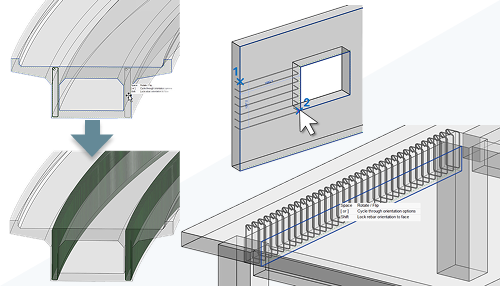
- Place shape-driven rebar directly in 3D views.
- Use familiar placement methods such as:
- Expand to Host
- By Two Points
- Place longitudinal and vertical bars aligned to concrete host faces.
- Place stirrups in beams and columns directly in 3D.
- Create path shape distribution rebar using a 3D workflow.
- Automatically highlight valid host faces during placement.
- Cycle through overlapping hosts using Tab.
Standard bar placement in 3D
You can now place single bars or sets directly in 3D views using the same workflows available in 2D.
- Near cover and far cover placement.
- Parallel to work plane orientation.
- Expand to Host placement.
- By Two Points placement.
Rebar automatically aligns to the highlighted concrete host face based on cursor position, placement orientation, and view direction.
Place stirrups directly in 3D
- Expand to Host.
- Near cover placement.
- Perpendicular to cover orientation.
Rebar sets automatically expand within the concrete host based on the selected layout.
Create path shape distribution rebar
Path shape distribution workflows can now be completed directly in 3D.
- Place one or more main bars aligned to a host face.
- Select a host edge as the distribution path.
- Finish the command to automatically generate distributed sets.
Each placed bar creates its own rebar set while maintaining consistent layout and properties.
Benefits
- Reduce switching between 2D and 3D views.
- Improve reinforcement modeling workflows for complex geometry.
- Increase placement accuracy using dynamic host face highlighting.
- Better support reinforcement detailing for buildings and infrastructure projects.
This feature is described on the product road map.