Map parameters to IFC property sets directly in the export workflow. Create and manage default or custom IFC property mappings, improving control over IFC data output.
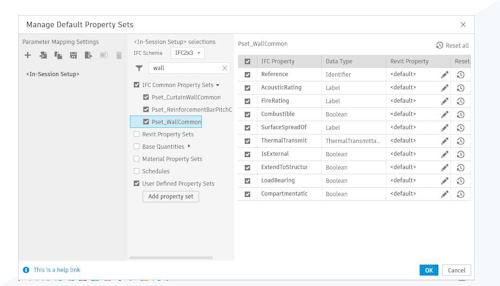
The IFC Export Setup dialog has added an interface for mapping parameters to IFC property sets during export. You can map parameters to predefined IFC property sets or create and manage user-defined property sets directly, without editing IFC text configuration files.
Access the mapping workflow from Export IFC > Modify Setup. To control which property sets are included in an export, use the drop-down menu to select a Property Mapping setup or click “…” to create, edit, save, import, and export a mapping configuration. This provides more predictable IFC output and simplifies coordination workflows that rely on consistent property data.
This feature is described on the product road map.
See Manage IFC Parameter Mapping Settings and Manage IFC Export User Defined Property Sets.