Incremental Model Open is available as a tech preview and can be enabled from the Revit Options.
Enable Incremental Model Open from Revit Home
- Launch Revit.
- Click File
 OptionsGeneral tab.
- Locate the Incremental Model Open section and click the checkbox to enable the feature.
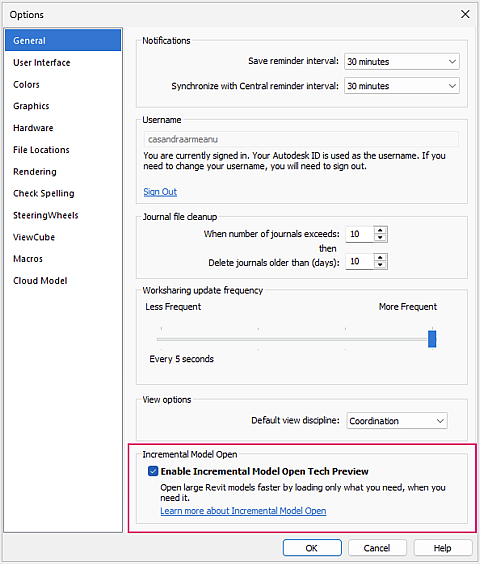
- Review the Autodesk Tech Preview Terms and Conditions.
- Click Accept.
Incremental Model Open is disabled by default. Once enabled, it remains active for the current Revit session.
Important notes
- Incremental Model Open is an application-level setting and cannot be enabled or disabled while models are open
- When enabled, models opened from Revit Home, by double-clicking an RVT file, or by drag-and-drop into Revit will use Incremental Model Open
Enable Incremental Model Open using Revit.ini
Incremental Model Open can also be enabled through the Revit.ini file.
- Close Revit.
- Open the Revit.ini file located at:
C:\Users<username>\AppData\Roaming\Autodesk\Revit\Autodesk Revit 2027
- Under the [Misc] section, add the following line:
IncrementalOpenDynamic=1
- Save the Revit.ini file.
- Restart Revit.
Incremental Model Open is enabled the next time Revit starts.