General Improvements
New file export options now let you exclude physics and constraint attachments when exporting VPB/OSB files. Additional enhancements include a Search bar in the Terminal, a Log Files option in the Help menu, interface improvements to Camera Editor Blending frames, as well as various scripting enhancements and updates to the Material SDK.
UI
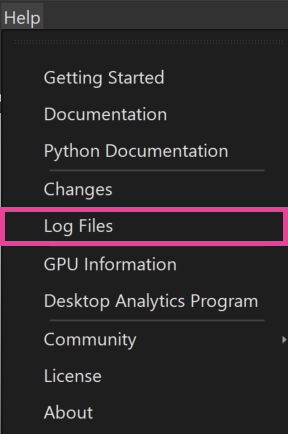
We added a Log Files option to the Help menu, which opens a folder containing log files, providing a quick and convenient way to access them.
Camera Editor
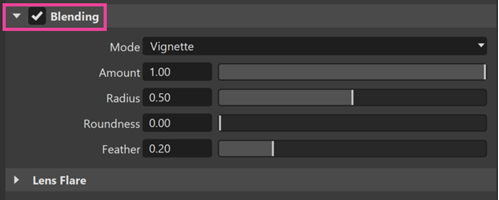
In the Image Processing tab, we've added a global toggle for turning Blending on and off in the setting's title bar. This means that you no longer need to expand the Blending settings to control it. By default, the Mode for Blending is set to Vignette.
Scripting
Scatter Tool
We added a Scatter Tool script plugin under the menu Scripts > ScatterTool that distributes one or more objects within a defined radius onto other objects. The tool supports setting the clone count, scatter radius, and randomization for rotation and scale.
Select the source objects in the Scene Graph and click Set Source Objects. The geometry must be inside a group node so it can be duplicated as transform clones. Optionally, select an existing target group; otherwise, VRED creates a new one automatically. Placement, rotation, and scaling are based on the object’s pivot. Make sure the pivot is located where the transformation should occur. If needed, reposition it - for example, to the bottom of the object.
Click Start Placement Mode and click in the desired area to place the scattered objects. While Placement Mode is active, viewport navigation is disabled and requires exiting Placement Mode to resume.
 See Example UI for implementing a scatter tool for more information.
Other Scripting Updates
vrScenegraphTypesand othervr...Typesare now automatically imported into script plugin context.- As part of the expanded physics simulation support in VRED 2027, the
vrPhysicsServiceclass received a large number of new functions, and thevrPhysicsTypesclass received several new sub-classes. - We added methods to
vrdTransformNodeandvrdTransformNodeVariantfor setting the rotation pivot orientation from a direction vector, and for changing the translation using a local translation value like in "Local Mode". - We added methods to
vrdTransformNodeto change the translation via a local translation vector as with the translation manipulator when Lo cal Mode is enabled. - Added
vrdGeometryNode.getObjectBoundingBox()to API v2 to return the geometry bounding box in object space, without any transforms applied.
For a complete list of what has been added or changed in the VRED Python API v2, see What's New in Python API V1 and V2.
Streaming Improvements
New URL Parameter to enable and disable key modifiers in VRED Stream
In VRED 2026, the Streaming App introduced support for sending A–Z and 0–9 keyboard events. As a result, VRED‑specific keyboard modifiers, such as using Shift + LMB to select objects, were no longer available in streamed sessions.
VRED 2027 introduces a new URL parameter that restores the previous behavior. Key modifiers for mouse interactions are enabled only when the allowKeyModifiers search parameter is set to true or 1.
File IO
- We've added import/read support for the following file formats:
- Inventor: 2027
- Parasolid Binary: 38
- Parasolid Text: 38
- NX: 2506 and 2512 Series
- SolidEdge: 2026
- 3D ACIS: ASM 232
- We've added export support for JT 10.7.
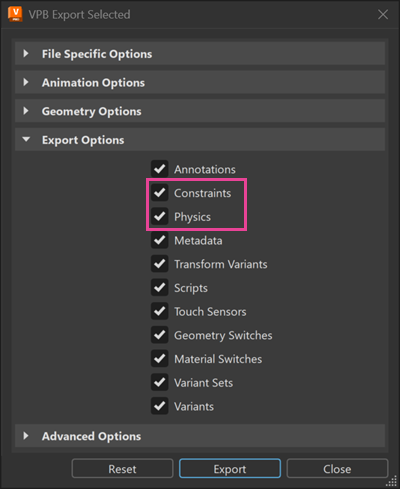
- Constraints and Physics attachments can now be excluded when exporting a scene or selection to the .vpb and .osb file formats.
- VRED now supports the following formats for Gaussian Splat files:
- SPZ and XGRIDS proprietary LCC format
- Compressed 3DGS PLY files
Terminal Window
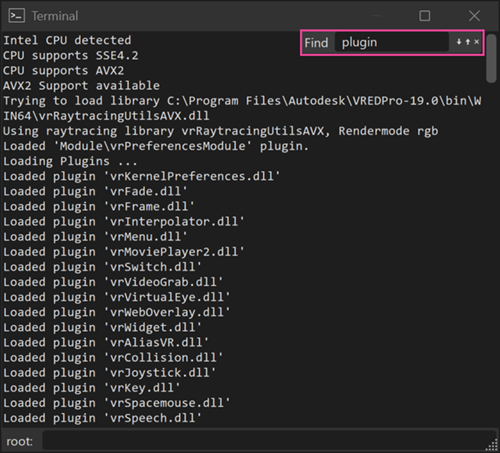
It is now possible to search in the Terminal Window with Ctrl + F.