XR Improvements
VRED 2027 modernizes the XR experience with an intuitive one-handed main menu that can follow your view or remain fixed in space, as well as enhanced XR collaboration with customizable and user-imported avatars. Alias users can now launch VR and XR sessions directly from Alias using VRED Presenter and VRED XR, making XR exploration and collaboration faster and more accessible.
XR Menu Modernization
In VRED 2027, you can enjoy a modern and efficient XR user experience, featuring a modernized XR menu. The XR menu is now designed to be easily accessed with one hand, and can follow your view or remain fixed in space.
The menu is organized into modules where you can find:
- Variants
- Viewpoints
- Tools
- Collaboration
- Settings
- Pin to Scene
 For more information, see XR Home Menu.
XR Custom Avatars
Find the new Custom Avatar functionality in the latest version of VRED. You can now customize the upper body of standard VRED avatars, or import your own Copresence avatar and seamlessly collaborate with others in XR. When setting up according to our guidelines, avatars will feature basic facial animations to enhance communication. Enjoy extended data exchange capabilities during collaborative XR sessions, meeting all customer needs, while adhering to security and privacy regulations.
A new Avatar frame can be found under Preferences > Collaboration. This setting defines the default avatar used in collaboration sessions and can still be changed afterwards from the Collaboration menu.
Available avatar types:
- Default: Basic VRED avatars.
- Custom: Avatars following the VRED avatar file structure; users must define the head, torso, and hands.
- Copresence: A single .fbx file containing the Copresence avatar. The required .fbx format is provided by Copresence.
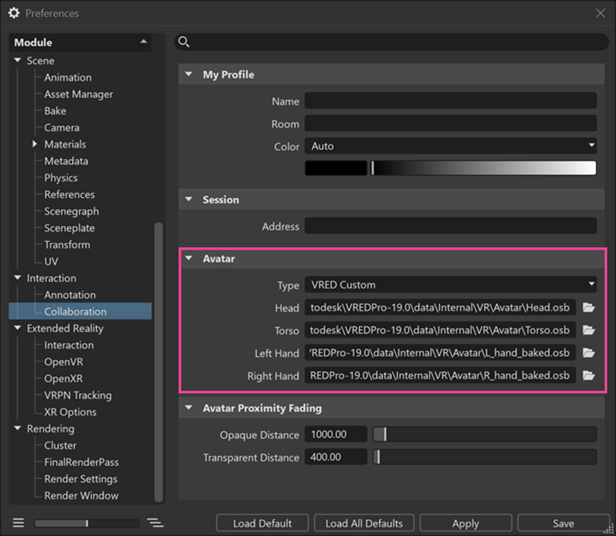
When a user joins a collaboration session, other participants see the selected avatar.
For more information see Adding a Custom Avatar.
View in VRED VR
Alias users can now launch VR sessions in VRED Presenter directly from Alias by selecting the new View in VRED VR option from the Visualization menu. There is no VRED expertise required, as Presenter starts automatically.
This provides seamless access to VRED’s latest VR capabilities, ensures future-proof hardware compatibility, and allows users to benefit from ongoing VR enhancements, including the new VRED VR home menu.

Open in VRED XR
Alias users can now launch VRED XR sessions directly from Alias through the new Open in VRED XR option from the Visualization menu, leveraging the full VRED feature set available in VRED Design or VRED Pro. This provides immediate access to the complete VRED XR experience without time-consuming data transfers or preparation, enabling seamless collaboration and immersive exploration with a single click.
