Customize How the Job Server Queue Displays Information
Sort jobs by ID, Status, Description, Submitted Date, or by the user who submitted them by clicking on the column heading.
Note: You must be an administrator to make changes to the Job Server Queue.
The Job Server Queue dialog displays up to 1,000 jobs. A warning appears if there are more than 1,000 jobs in the queue.
Access the Job Server Queue by selecting Tools > Job Queue in the Vault Client.
Right-click on the column heading to customize the layout and view of the queue.
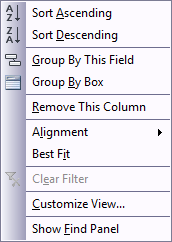
To add the Workgroup column, right-click the column heading and select Workgroup.
Note: The Workgroup column displays the workgroup assigned to each job. Available in Vault 2027 and later. See View Workgroup Information in Job Queue for more information about this enhancement.
- If you want to filter the list so that it only displays the jobs queued after a specific date and time, click the Queued After list and specify a date.