Job Server Administration
The Job Server is a feature used to off-load client side jobs from the engineering workstation, e.g. visualization file publishing (DWF) during the check in process.
Publishing visualization files of large assemblies can slow the check in of designs. By off-loading this process, users can quickly check in files and ensure consistent visualization file creation. The Job Server can also be used to synchronize properties, publish PDF files, or execute other custom jobs after a lifecycle change has been invoked on a file.
Job Server Components
The Job Server consists of two components:
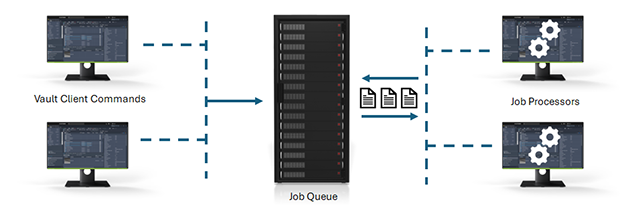
Job Queue - A list, or queue, of jobs submitted by clients (Inventor, AutoCAD, Vault, Autoloader) waiting to be processed. This queue is stored in and managed by the Vault Server.
Job Processor - is a separate application that reserves queued jobs and pulls them from the job server to process them. Since the job processor is installed along with the vault client, any workstation with Autodesk Vault Professional can be used to process jobs.
You can sign into your Autodesk Account through the Job Processor. Click here to learn more.
How It Works
Jobs are submitted to the job server when:
- A user checks in a file which needs a visualization file created.
- A user invokes an Update View command inside of the Vault client application.
- Autoloader is used to load files into the vault and visualization files are needed.
- A status change occurs on a file and an updated visualization file is needed.
- A user invokes Create PDF, Create DXF, or Create STEP command inside of the Vault client application.
- A status change occurs on a file and an updated PDF, DXF, or STEP file is needed.
- A status change occurs on a file and a custom job is needed.
- A status change occurs on a file and properties need to be synchronized in the file.
Multi-Site Support for the Job Server
In a multi-site or connected workgroup environment, Job Processor behavior depends on how you configure processing:
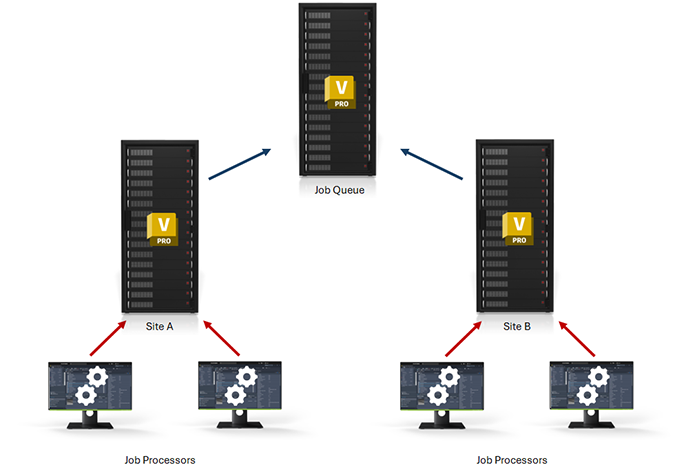
Default: The Job Processor processes jobs only for the Vault server saved in File > Server Credentials. In the illustration below, a Job Processor connected to Site B processes jobs for Site B only; the same applies for Site A.
Optional (Vault 2027.1 and later): You can enable Enable job processing from any server or Workgroup so one Job Processor can reserve jobs from accessible servers and workgroups.