Shape objects are used to define the cross-section shape of an open channel link.
The shape is selected in the Shape ID field of the Open channel property sheet.
For each open channel link, an existing shape or user-defined shape can be selected.
Standard shapes
The cross sectional shape of the link is defined by an abbreviated name. Choose one of the following standard shapes from the drop-down menu.
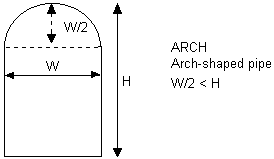
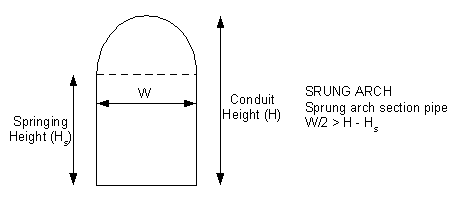
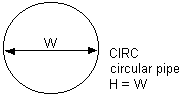
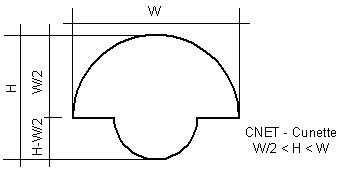
Pipe opening shapes
|
ARCH |
|
| ARCHSPRUNG |
|
|
CIRC |
|
|
CNET |
|
|
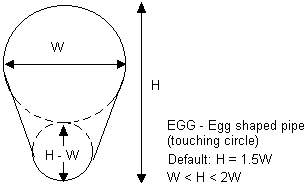
EGG |
|
|
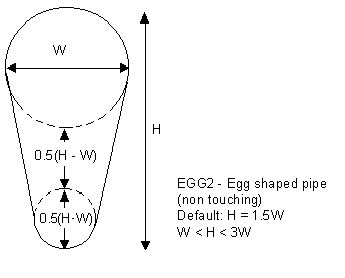
EGG2 |
|
|
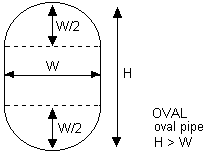
OVAL |
|
|
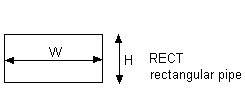
RECT |
|
|
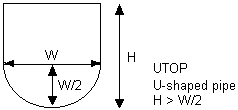
UTOP |
|
Channels
The following open channel shapes can be specified for conduits:
|
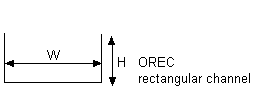
OREC |
|
|
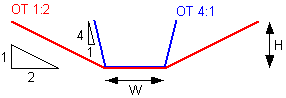
OT4:1OT2:1OT1:1OT1:2OT1:4OT1:6 |
Trapezoidal channel OTx:y, where x:y defines gradient of side slope of channel. |
|
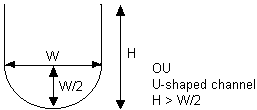
OU |
|
|
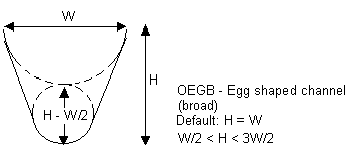
OEGB |
|
|
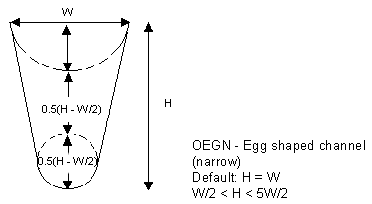
OEGN |
|
User-defined shapes
Users can define their own shapes. A user-defined shape is defined by a set of height-width relationships. Vertically symmetric or vertically asymmetric cross sections can be defined.
See User-defined shape topic for further details.