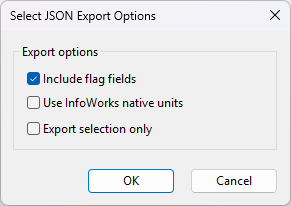
When exporting a network/control to JSON files, the dialog gives the following options:
| Parameter | Description |
|---|---|
|
Output File |
Clicking the ellipsis button displays a standard File Open dialog, which allows you to select the location where the output file will be saved. Note: This option is only available when the dialog is accessed by clicking the Export Network/Control from JSON task in the
Task Sequence editor.
|
| Include flag fields |
Select this option to export flag data. |
| Use InforWorks native unit |
Export using Native Units / current User Units |
| Export selection only |
Export the selection. If not selected, the entire network/control will be exported. |