Import and Export Naming Standards
You can import and export naming standards between projects to aid consistency and save time recreating the same naming standard multiple times. You can also download and edit the default ISO 19650 naming standard template to import into your projects.
Import Naming Standard
You can import a naming standard to a project using an XLSX file that is either of the following:
- A downloaded, edited and saved copy of the naming standard template
- A naming standard exported from another project
Click on the Files tool.
Click Settings.
Hover over Compliance.
Click Naming Standards.
Click Create naming standard.
Click From imported XLSX file.
Click choose a file to add a naming standard XLSX file you've:
- exported from another project
- customised using the XLSX template.
Note: Click Download template to download an XLSX file containing the default ISO 19650 template.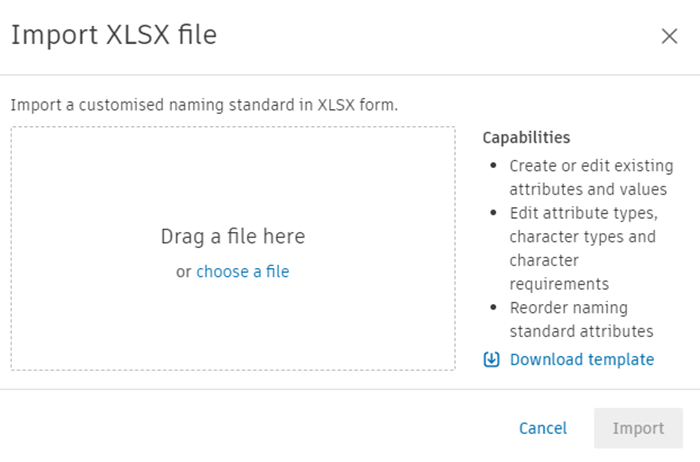
Click Import
Resolve any conflicts between existing custom attributes and those in the imported naming standard. See Resolve Naming Standard Attribute Conflicts for details.
You can edit the naming standard once it is imported.
Export Naming Standard
Click on the Files tool.
Click Settings.
Hover over Compliance.
Click Naming Standards.
Click on the More menu
 of the naming standard that you want to export.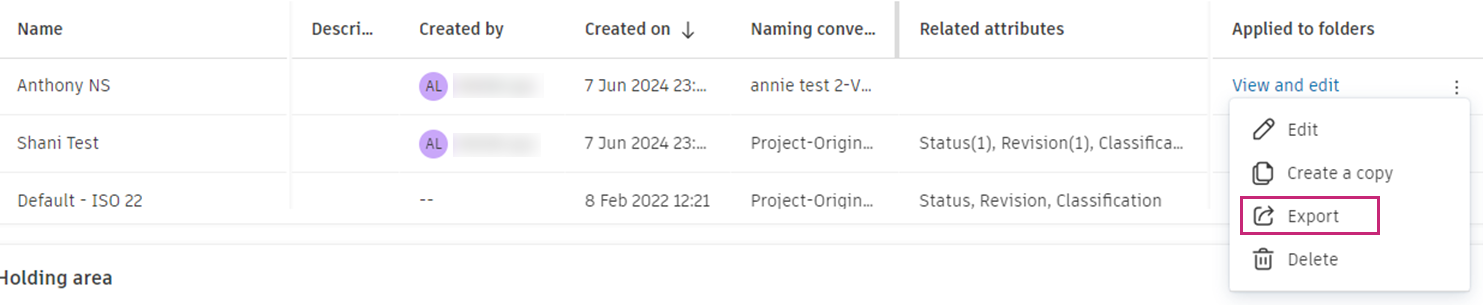
Click Export.
The naming standard will download to your local downloads folder as an XLSX file. This file is formatted to import into another project.