Describes the terms used to refer to various elements on the Autodesk Home main user interface.
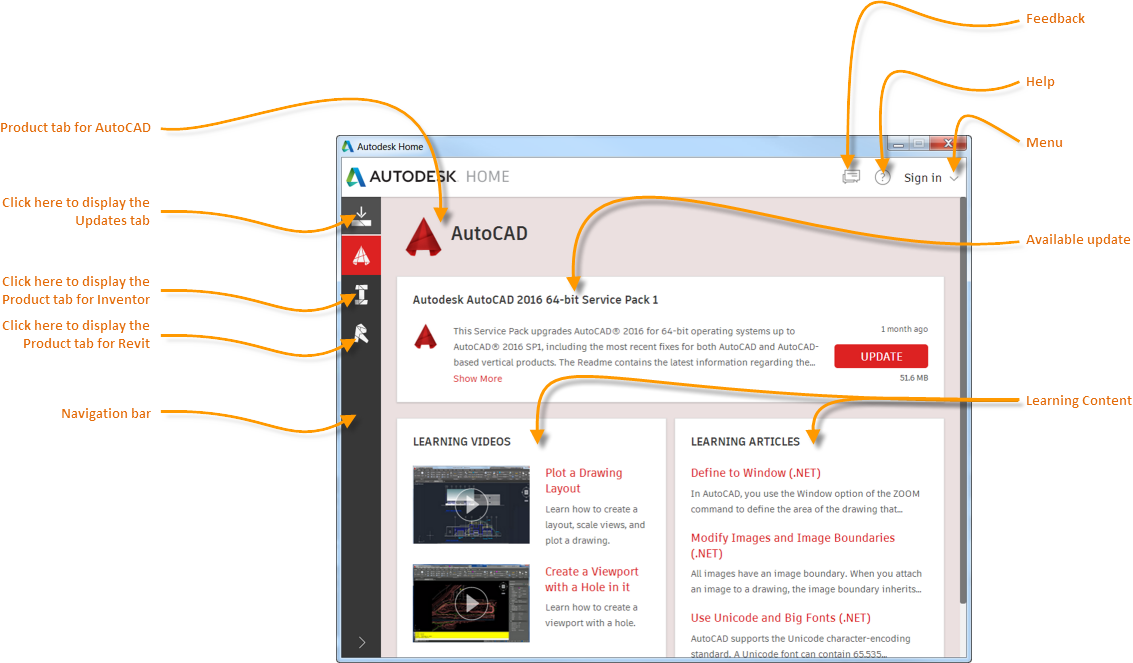
- Product Tab
- Displays available updates and learning content for the selected product.
- Updates Tab
- Displays a consolidated list of updates that are available for the 2015 and 2016 versions of Autodesk products installed on your computer. This tab is visible only when updates are available.
- Navigation Bar
- Displays the product icons of all the Autodesk products installed on your computer. Moving the cursor over an icon displays the name of the product. Click an icon to display the Product tab for that product.
- Feedback
- Displays a form that captures comments that you want to send to Autodesk.
- Help
- Displays a searchable set of topics that explain how to use Autodesk Home.
- Menu
- Displays a list of commands that you can invoke. The content of the menu depends on whether you are signed in or not.
- Available Update
- Informs you that a service pack, hot fix, or security patch is available for download. Available updates are displayed in the Updates tab as well as on the relevant Product tab. Once you install the update, this is removed from both tabs.
- Learning Content
- Displays links to videos and articles that are dynamically fetched from the Internet. The content depends on the subscription status of the product and your learning requirements.