Manage Outgoing
The Outgoing tab in Bridge shows a log of the content from your project that has been shared out to other projects.
This log tracks the following types of shared content:
In this topic, you'll learn how to:
Navigate the Outgoing Tab in Bridge
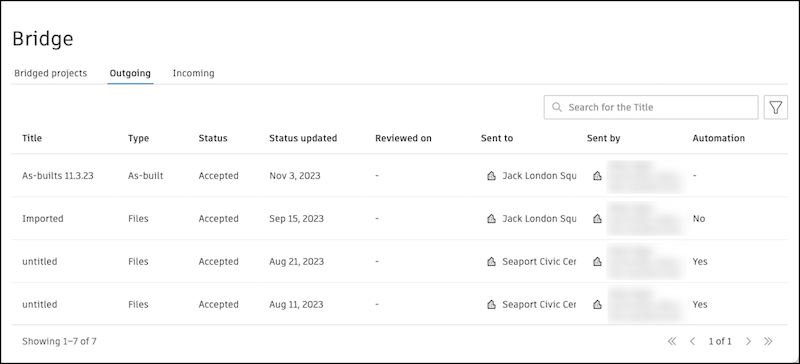
In the Outgoing tab of the Bridge tool, there is a table with entries for each time content was shared out of your project. You can also share content with another Autodesk Forma project directly from the Bridge tool.
Click Share with a project to share content with another Autodesk Forma project.
See Share Files and Folders with Another Project from Bridge and Share Sheets with Another Project from Bridge for more information.
Search for shared content using the title defined when the content was shared.
Filter the table to show specific entries.
Note: By default, the table is filtered to show outgoing content in the last 31 days. You can change the date range, but the maximum range is 31 days. You can also filter by other criteria like type, status, who it was shared to, and more.
Work with the Outgoing Table
To view details about each share, you can either:
- Click an entry in the table.
- Click the More menu
 at the end of the row and select Open in a new tab.
To archive an entry, click the More menu
at the end of the row and select Archive in the current project. Learn more about archiving entries.
Columns in the Outgoing Table
The following columns can be displayed in the table for each shared item:
Title: This value can come from:
The title entered when the items were shared. If none was entered, the title is "untitled".
If a file or sheet is shared through an automation, the corresponding file or sheet name appears as the title.
The RFI number and title
If items from this project are imported into another Autodesk Forma project, the title will be Imported.
Type:
- Files: Received from another project
- Sheets: Received from another project or from a link
- RFIs: Received from another project
- As-builts: Received from another project
- As-builts (PlanGrid): Received from a PlanGrid project or workspace
Status: Sent, In review, Accepted, Rejected, Expired, Partially failed, or Failed
Sent: When sheets are shared with a link, this indicates that the sheets were sent to the recipients.
In review, Accepted, Rejected, or Expired: When shared files must be accepted by a project administrator, this is the status of that process.
Note: Invitations to accept or reject files expire in 30 days. If expired, you can share the content again to restart the process.Partially failed: Multiple items were shared at one time. One or more files or folders failed to share, but other items were successful. Learn more about troubleshooting Bridge failures.
Failed: The content was not successfully copied to the target project. Try again.
Reviewed by: The project administrator who accepted or rejected the content
Shared to: The project the content was sent to
Shared by: The member who sent the content
Shared on: The date the content was shared
Automatic syncing enabled: Yes or No. This indicates whether an automation was enabled when the original content was shared.