Admin Update Suppressions Guide
Update Notification Suppression
Desktop Connector will alert the user when an update of the software is available. Administrators can turn off these notifications in a Windows 10 or 11 version supported by Microsoft.
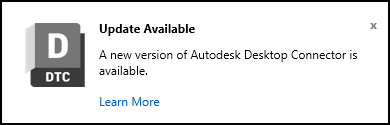
This setting only impacts the update notification and does not suppress other types of notifications. This setting will also suppress the visibility of the Update Available command in the home screen menu. This registry value can be set at any time, including at deployment time.
In the search box on the taskbar, type regedit, then select Registry Editor

The registry value can exist in different locations, depending on preference and which version of Desktop Connector you are running.
- From version 16.9.1.2222 on:
- To apply to the current user:
Computer\HKEY_CURRENT_USER\Software\Autodesk\Desktop Connector Advanced Settings - To apply all users of the current machine:
Computer\HKEY_LOCAL_MACHINE\SOFTWARE\Autodesk\Desktop Connector Advanced Settings
- To apply to the current user:
- On versions 16.8.0.2169 or below, the notification suppression will only affect the current user and the location must be:
Computer\HKEY_CURRENT_USER\SOFTWARE\Autodesk\Desktop Connector\AdvancedSettings
Important Notes:
- For the HKEY_LOCAL_MACHINE path, "Desktop Connector Advanced Settings" is a single key name (not separate keys with backslashes)
- You will need to create the "Desktop Connector Advanced Settings" key under the Autodesk key if it doesn't already exist
- This registry location is recommended because it persists through Desktop Connector uninstalls and upgrades, unlike paths under the Desktop Connector installation directory which can be removed during updates
- From version 16.9.1.2222 on:
Create a
DWORDin the Advanced Settings key:SuppressUpdateCommandAndNotificationsNote: TheSuppressUpdateCommandAndNotificationsregistry value does not exist by default and must be created by the user.Set the value of
SuppressUpdateCommandAndNotifications = 1Restart Desktop Connector