Object Table Configurations
Project administrators can save object table configurations to the project. A saved configuration can include the following object table settings:
- Property groupings
- Displayed columns
- Column width and sort order
- Display mode.
Project members can then apply a saved configuration to the object table for each model view, to quickly set up their data overview, helping to standardize workflows across teams.
Project administrators can also set a default configuration for the project. The default configuration will be shown whenever a new model or view, with no configuration applied, is opened.
Create and edit configurations
Edit the data table groupings and columns as required.
Tip: If you edit the data table and then save or update the view, the selected groupings and column settings are saved against the view, and will be displayed whenever the view is opened.Click Configurations.
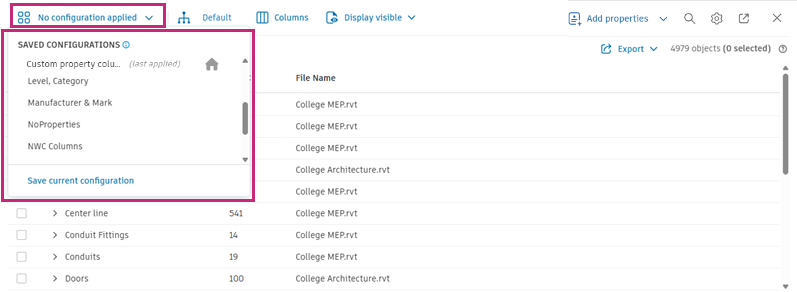
A drop-down list opens, displaying any previously saved configurations.
The Home
 icon indicates which configuration is the default for the project.
 Last applied indicates which configuration was the most recently applied to the view. This is typically the configuration that is currently displayed.
- A blue dot indicates that the current configuration in the view is different from the last configuration applied to the view.
If there are no current configurations, or no configuration set as default, the data table is displayed using the standard system configuration.
Click Save current configuration.
Select either the Create new or Overwrite existing option depending on whether you are creating a new configuration, or editing an existing one.
Enter a name for the new configuration, or select the name of an existing configuration from the drop-down list.
If you are overwriting an existing configuration, optionally select the Rename configuration check box, and enter a new name for the configuration.
Click Save.
The new or updated configuration is applied to the current view, and saved to the project for use by other project members.
Apply configurations
- Open the view that you want to apply the configuration to.
- Click Configurations.
- In the drop-down list, hover over the name of the configuration you want to apply.
- Click Apply.
Last applied is displayed against the name of the applied configuration.
Set or change the default configuration
To set the default:
Click Configurations.
In the drop-down list, hover over the name of the configuration you want to set as the default.
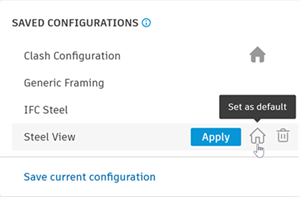
Click the Home icon.
Click Confirm to set the default configuration.
The Home icon is displayed against the name of the default configuration.
To remove the default:
- Click Configurations.
- In the drop-down list, hover over the name of the default configuration.
- Click the Home icon.
- Click Confirm to remove the default setting.
With no default configuration set for the project, the data table is displayed using the standard system configuration unless another configuration is applied.
Delete configurations
- Click Configurations.
- In the drop-down list, hover over the name of the configuration you want to delete.
- Click the Delete
 icon.
icon. - Click Confirm to delete the configuration.
The deleted configuration is removed from the project. If the configuration was the default, the data table is displayed using the standard system configuration unless another configuration is applied.