Preconstruction
Preconstruction library items are only available to Preconstruction Bundle subscribers.
In the Library tool in Hub Admin, you can set up pre-defined standards for costs and line items that can be used as default data for Preconstruction projects in your hub.
Click the Preconstruction card in Library to open the Preconstruction library page.
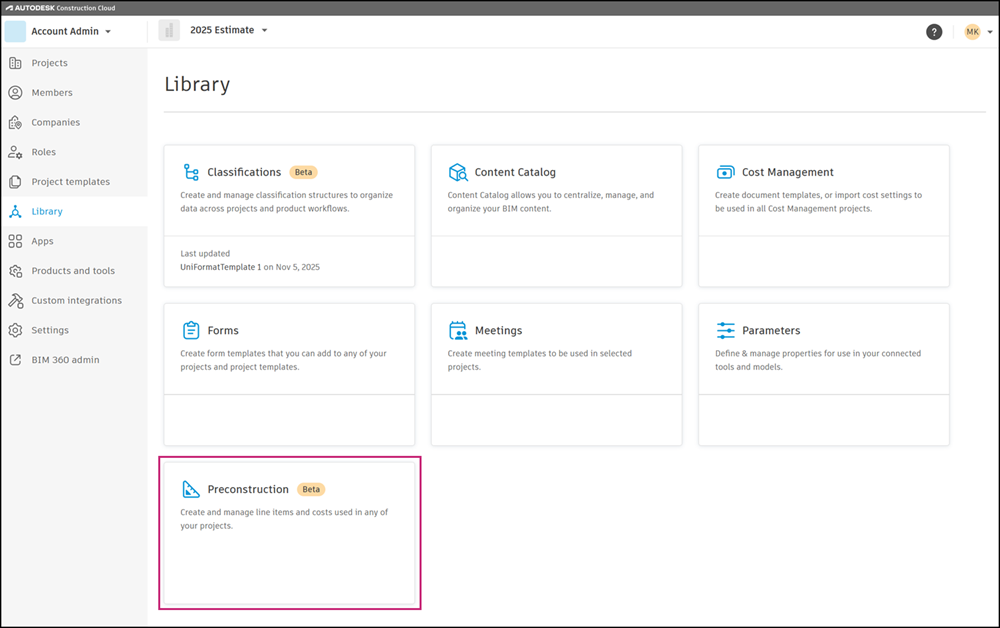
From this page, you can access the Line Items and Costs tabs where you can set up these library items for use in Estimate and Takeoff.

Preconstruction Library Settings
Configure general settings for base currency and time frame conversions, and assign classifications to the Preconstruction library in Preconstruction library Settings. Hub administrators can access these settings by clicking the Settings link on the Preconstruction library page.

General Settings for Preconstruction Library
To configure general settings for Preconstruction Library:
- Select Hub Admin from the product picker dropdown at the top left of the page in Autodesk Forma.
- Click Library in the left navigation.
- Click the Preconstruction card to open the Preconstruction library page.
- Click the Settings link at the top right of the list to open the Settings page.
- By default, the General tab will open.
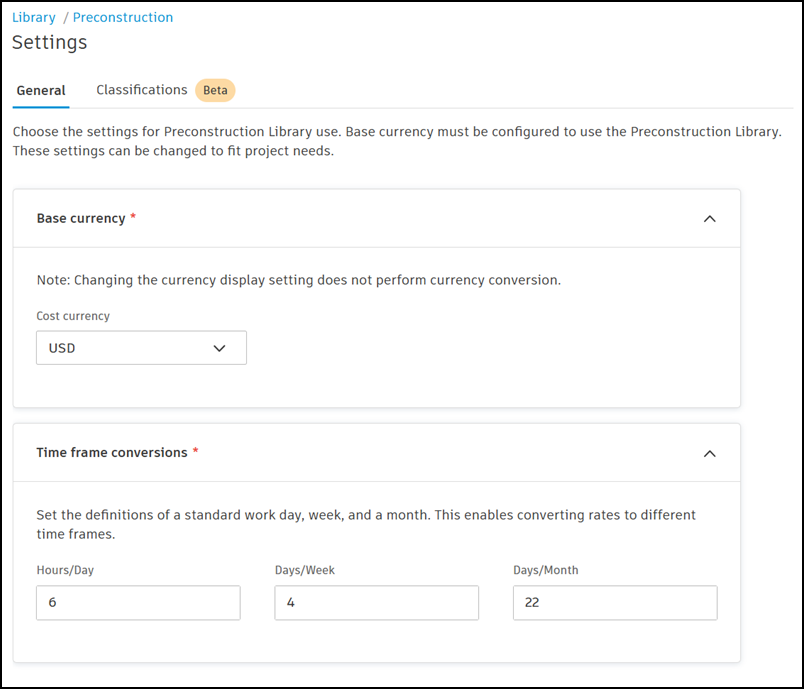
- Set base currency and time frame conversions. Base currency and time frame conversions are required in order to use the Preconstruction Library.
- Base currency – Select the currency that library items will display.
- Changing the currency display setting does not perform currency conversion.
- The Preconstruction cost library is limited to a single base currency.
- Time frame conversions – Set the definition of a standard work day, week,
and month. This enables conversion rates to different time frames.
- Base currency – Select the currency that library items will display.
Classifications in Preconstruction Library Settings
Classifications must be added to the hub Library in Hub Admin before they can be assigned to Preconstruction Library. Learn more about managing hub classifications in Library.
Hub administrators can configure settings to assign library classifications to their hub’s Preconstruction Library. Once assigned, classification structures from your hub library can be used by Preconstruction Library line items.
Assignment of library classifications to Preconstruction Library is required for library line items to be tagged with classifications.
To assign Library classifications to Preconstruction Library:
- Select Hub Admin from the product picker dropdown at the top left of the page in Autodesk Forma.
- Click Library in the left navigation.
- Click the Preconstruction card to open the Preconstruction library page.
- Click the Settings link at the top right of the list to open the Settings page.
- Click the Classifications tab to open Classifications settings.
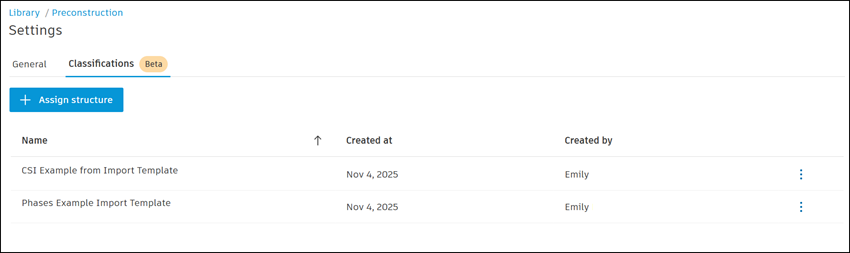
Click +Assign structure.
In the Select classification structure modal, select up to 5 classification structures from Library to make them available in the Preconstruction Library.
Click Add.
The assigned library classifications will now be available to items in your Preconstruction Library.