Share Project Templates with Other Forma Hubs
Hub administrators or standards administrators can share a project template with another Forma hub in the same data center, so administrators and teams there can use it.
- You can share a template only with a hub in the same data center. Sharing isn't available across data centers.
- You must be a hub administrator or standards administrator in the target hub to share a project template with that hub.
In this topic, you'll learn:
- What can't be shared in a project template
- How to share a project template with another hub
- View a log of what project templates have been shared
What Can't Be Shared in a Project Template
When you share a project template to another hub, some configurations can't be shared because the contents of a hub, such as the members of a hub, differ.
The following aren't shared to the target hub:
- Template members and project members
- Roles
- Library objects
The shared template is create as Unpublished in the target hub, even if the source template is published. Publish the template to make it available to create projects.
Share a Project Template with Another Hub
Navigate to Hub Admin.
Click Project templates on the left navigation.
Click the More menu
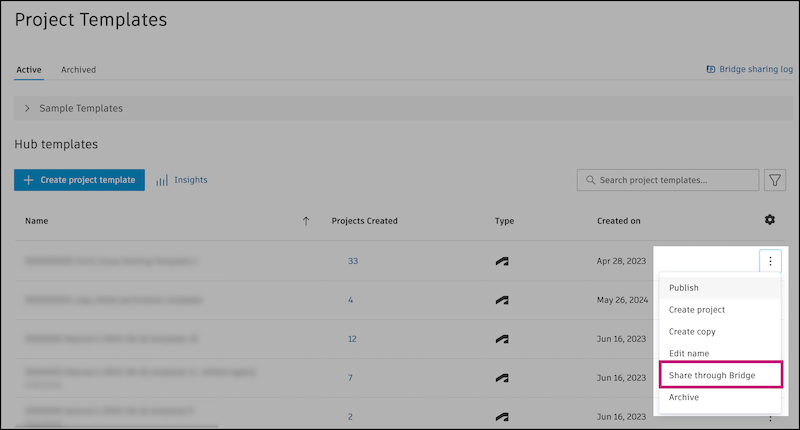
 next to the template you want to share, then click Share through Bridge.Note: You can share only one active template at a time.
Bridge is the enabling technology that lets you share project templates across hubs. You can see a log of what project templates have been shared in the Bridge sharing log. Learn more in the following section in this topic.
In the Share with another hub through Bridge dialog, enter a name for the template in the target hub.
Note: The template name must be unique in the target hub. It can't match a project template or project name. The maximum length is 255 characters and can't contain any special characters. If you reach these limits or don't meet this criteria, you'll see an error and need to enter a different name.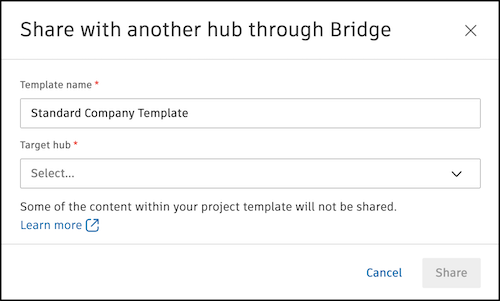
Select the target hub.
Note:- You can share a template only with a hub in the same data center. Sharing isn't available across data centers.
- You must be a hub administrator or standards administrator in the target hub to share a project template with that hub.
Click Share.
View the Bridge Sharing Log for Shared Project Templates
Track the project templates you've shared and received in Bridge sharing log.
Navigate to Hub Admin.
Click Project templates on the left navigation.
Click Bridge sharing log at the top right corner.
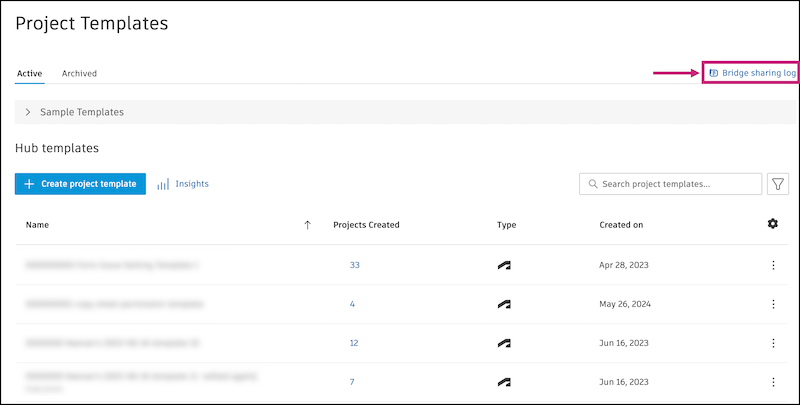
The Bridge sharing log lists each shared template's name, status, the sending and receiving hubs, who shared it, and when.