Text Data Type
The Text data type is used to store a string value. This data type is typically used for the ID or name of an object type, as only fields with the Text type can be flagged as the object Key or Label. However, text fields can store any kind of text information, such as an object's status. Text fields can have one of the following modifiers:
- None Stores text strings. Text does not wrap and is showed on a single line.
- Multi-line Stores text strings. Text wraps and is shown on multiple lines.
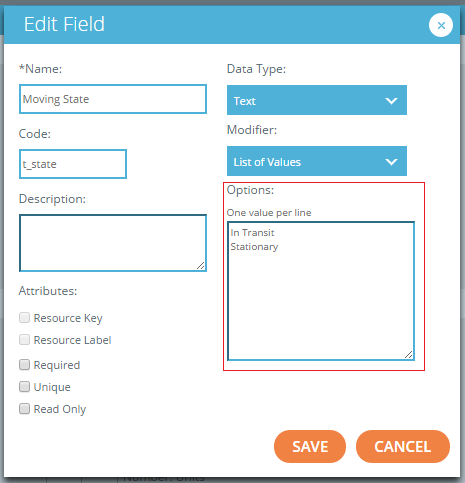
- List of Values Stores a list of all possible values a field can assume. For example, a "Trailer" resource type could have a "Moving State" text field with this modifier, and the user could provide two possible values for that field: "In Transit" and "Stationary."
The system also supports validation for fields with this modifier.
For example, if a user enters text for a field that is not found in the list of values, the system displays an error message stating that the user has provided an invalid value.
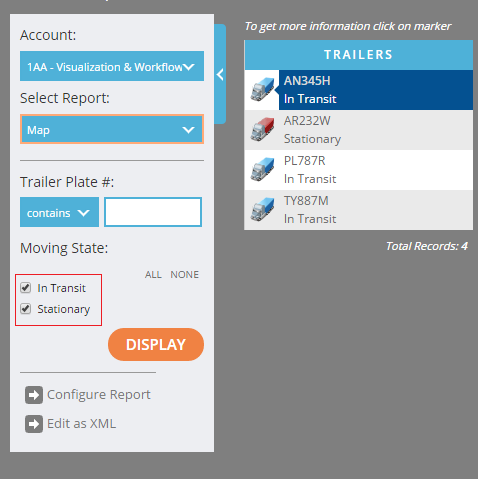
If a field with this modifier is used as a criterion in a report, that criterion will appear as a series of checkboxes on the filter of the report, one for each defined value.
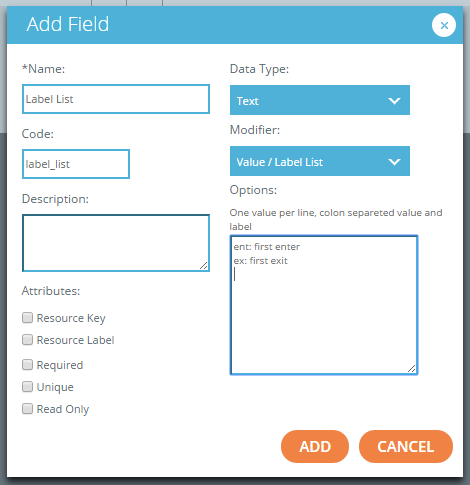
- Value/Label List Separates a field into a Label that is displayed to users and a Value that is used in the Routines engine. The label in this pairing appears on reports, similar to a List Value. However, users can only input strings that match a defined label. The label also appears on checkboxes for a criterion. When referencing a value in the Routines engine, such as checking whether a field is set to a certain value, users would enter the value in this pairing.
- Auto-Number Used to create a numeric text field that is automatically set by the system when a new object is created. The value automatically increments for every record. The Auto-Number modifier is particularly useful for an ID field of an object. For example, when an object (typically an event record) is created within a Routine, an ID is generated automatically, higher than that of the previous record created. As shown in the following image, fields with this modifier require three pieces of information: the Pattern, the Next Value, and the Increment.
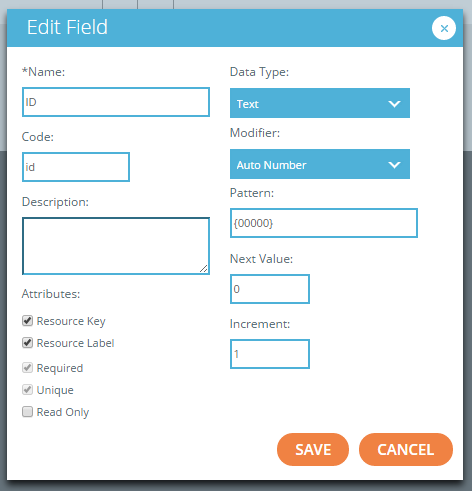
- Pattern— the format of the generated number. Should be enclosed in brackets.
- Next Value— the next value that should be generated. This value is used to set the first value of the assigned field upon creation or to skip to a higher number later on.
- Increment— the amount by which the field will increase for each subsequent object. In the above example, the first record will have "00000" ID, the second record "00001" ID, the third - "00002" ID, and so on.
- Dictionary Used when a field must contain the identifier of a defined resource in the system.
When creating this field, a user selects a resource type, and when the field is set either in an embedded editor, a form, or as a criterion, it appears as a drop-down list, containing the Resource Label of every defined resource of the specified type.
While this field does not contain an actual reference to the object, this label is useful for displaying on reports or to use when joining multiple object types in a data query.