Work with a shared part number list
This content only applies if you're working in a hub with collaborative editing. Check for this icon  next to the hub name to confirm that you're using a collaborative editing hub. Learn about collaborative editing.
View and work with a list of models that share a part number.
Open the shared part number list
If necessary, click the Show Data Panel icon
 to open the Data Panel.
In the Fusion Browser, right-click the model that is part of a shared part number group and select Properties.
In the Properties panel that opens, beside the shared part number indicator icon, click More
 and select Show all models in a group.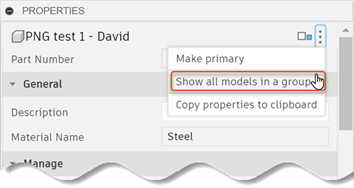
The Shared Part Number dialog opens.
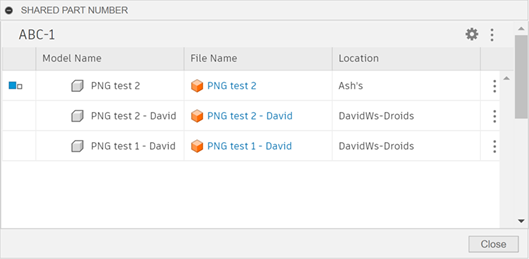
The dialog lists all the models that share the part number shown at the top. The primary model is indicated by the primary icon
 .
.Optional: Click the Model Name column header to sort alphabetically.
Note: Sort is not supported if there are more than fifty rows in the table.Optional: Should data in the list seem to be out of date, click More
at the top right of the dialog and select Refresh.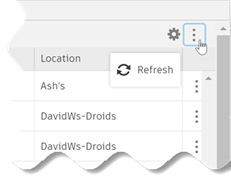 .
.
Open a model from the Shared Part Number dialog
On the right side of the dialog, click More
in the row of the model you want to open.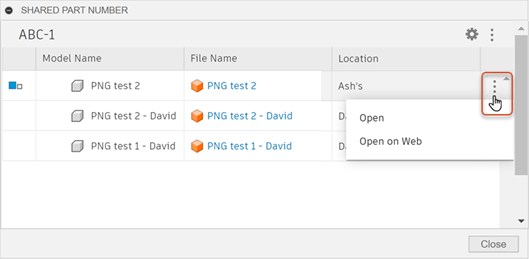
Select where you want the model to open.
Open: Opens the model in Fusion.
Tip: Click the link in the File Name cell to do the same thing.Open on Web: Opens the Overview page for the model in the Fusion web client.
Customize Shared Part Number columns
- At the top right of the Shared Part Number dialog, click Column Settings
 to open a list of available columns.
 - Select or deselect the column names you want to show or hide.