Surface Manager
The Surface Manager (previously known as Avoid/Machine Surfaces) option lets you avoid or machine a selection of surfaces, which are specified as Surface Groups. When machining surfaces, this option may be more suitable than using a Machining Boundary because the boundary confines the toolpath in 2D, whereas the Surface Manager confines the toolpath in 3D. Use this option to avoid surfaces when possible. It may be more effective than using Model surfaces, since any unselected model surfaces are ignored during toolpath generation—potentially causing gouges or collisions.
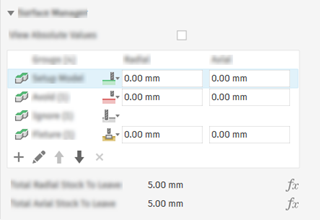
Surface Manager option in the Geometry tab
The Surface Manager group gives you more control over what actions you can perform on surface groups. You can select one or more surface groups per operation, and they can each have their own action. Depending on the toolpath, the available actions are:
- Avoid
 : The tool avoids the surfaces by a specified clearance.
 - Machine
 : The tool machines the surfaces to the stock to leave values.
 - Ignore
 : The tool can cut through the surfaces when they are in the tool's path.
 - Fixture
 : The tool avoids the fixture surface by the specified clearance.
Clearances
Any clearances you specify in the table affect the surface group. However, there are additional clearances that affect the toolpath globally, which are added to the surface group clearances:
For Avoid surface groups, the total clearance combines values from two places:
- Surface Manager — Radial and Axial clearances for the group
- Passes tab — Axial and Radial stock to leave
For Machine surface groups, the total stock to leave combines values from two places:
- Surface Manager — Radial and Axial stock to leave for the group
- Passes tab — Axial and Radial stock to leave
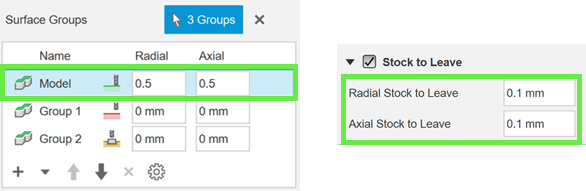
Total clearance for a surface group set to MachineFor Fixture surface groups, the total clearance combines values from two places:
- Surface Manager — Radial and Axial fixture clearances for the group
- Setup dialog — Axial and Radial fixture clearances in the Fixture group
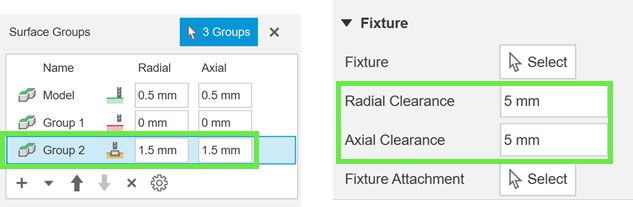
Total clearance for a surface group set to Fixture
Viewing total clearances
You can view the total values for each surface group by selecting a row from the table:
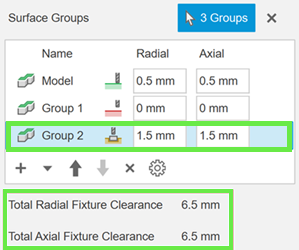
Total clearances for each surface group
If you want to view the total values for all surface groups in the table, you can select the View Absolute Values checkbox:
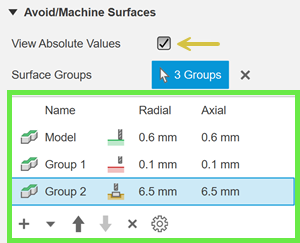
Viewing absolute values for all surface groups
Machine Over Holes/Pockets
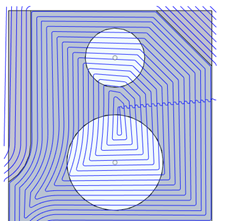
Creates patch surfaces that enable toolpaths to pass over holes or pockets, rather than going around the opening. The continuous motion creates a more uniform toolpath across the area, helping to improve surface finish and possibly reduce cycle time.
The selected surface must fully surround the hole or pocket. Partial holes or pockets are not supported.
 |
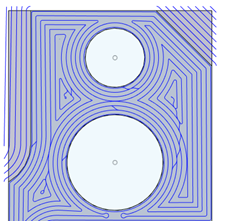 |
| Selected Machine Over Holes/Pockets | Deselected Machine Over Hole/Pockets |
Selection set from a surface group
This feature is part of an extension. Extensions are a flexible way to access additional capabilities in Fusion. Learn more.
You can create a reusable selection set from any row in the Surface Manager table. This lets you share the same group of surfaces between toolpaths by adding the selection set back into the table when needed.
- The selection set is an independent copy. If the original surface group changes later, the selection set does not update. Similarly, changes to the selection set will not affect the original surface group.
- If you exit the toolpath dialog using Cancel, the selection set is not created.
- You can add a selection set back to the Surface Manager table to reuse it across other toolpaths.
Priority of actions on surfaces
A surface group is a selection of one or more surfaces. If two groups contain the same surface, then the group that is furthest down in the table (usually the most recent selection) takes priority and determines the action for that shared surface.