Multi-Axis Roughing strategy
This feature is part of an extension. Extensions are a flexible way to access additional capabilities in Fusion. Learn more.
The Multi-Axis Roughing strategy (previously known as Multi-Axis Clearing) clears out areas such as pockets with curved floor surfaces. Unlike Adaptive Roughing and Offset Roughing (previously known as Pocket) strategies that use planar slices at constant Z levels, Multi-Axis Roughing slices the part by offsetting from the floor surface, keeping the toolpath more complete and reducing fragmentation and retracts.
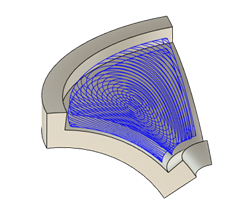
Multi-Axis Roughing toolpath on a curved floor surface.
The strategy creates a toolpath by offsetting from a specified floor surface. You can also optionally specify a ceiling surface to control how the toolpath is offset between the floor and ceiling surfaces. If you don't specify a ceiling surface, the strategy automatically detects large holes and creates a tangential cap to use as the ceiling.