Drill views
A drill view is a 2D view of a PCB that shows the location of every drill and hole on the board as a symbol, placed on a drawing sheet in an electronics drawing. Use a drill view together with a drill table to give fabricators and inspectors a complete drill map of the board.
The following image shows a drawing of a mechanical assembly that contains two PCBs. Each PCB has a drill view and a drill table on the sheet, and its own Drills Views node in the Browser.
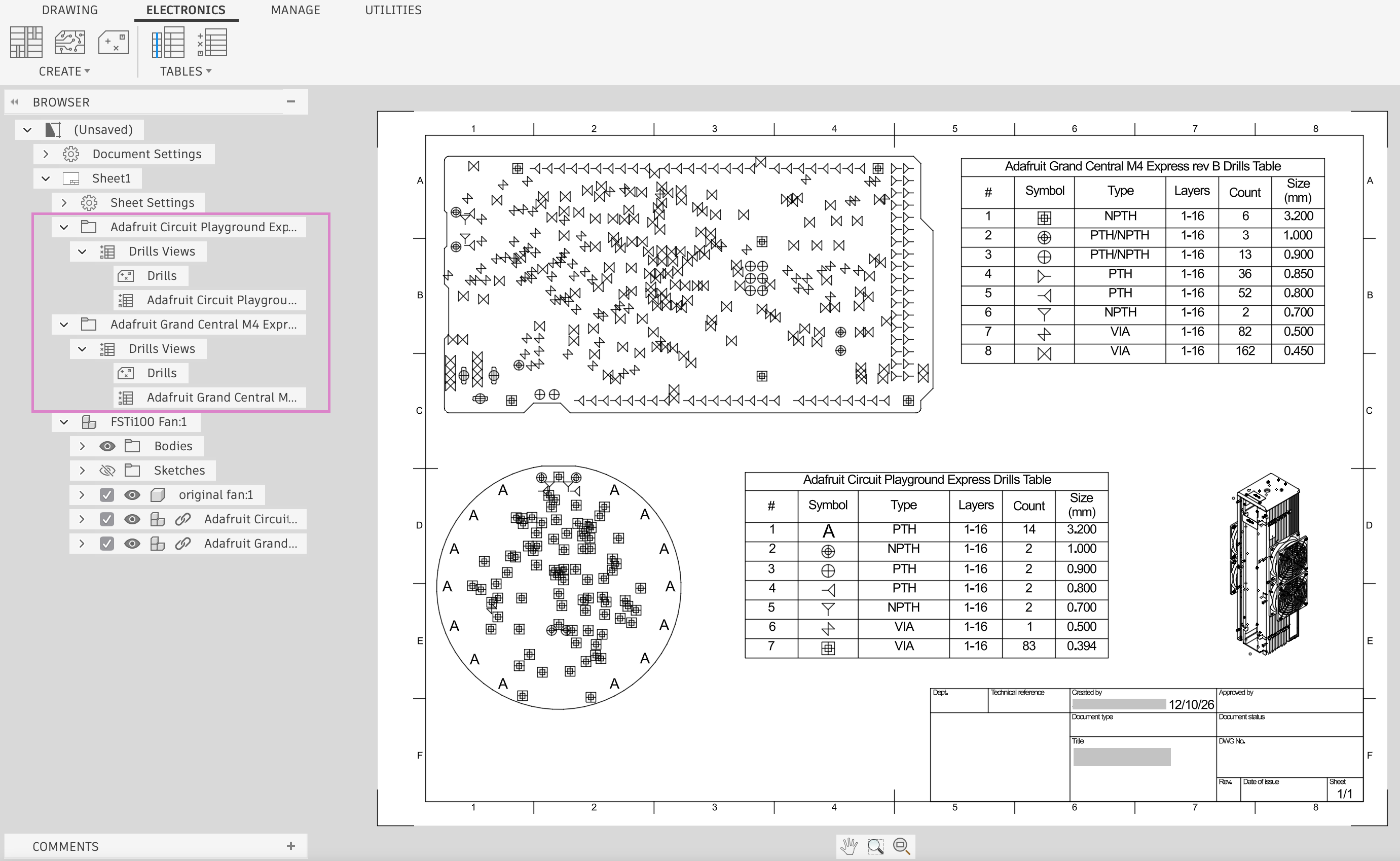
What a drill view shows
A drill view shows the board profile, which is the board outline and any cutouts. On top of the profile, it shows a symbol at each drill and hole location. A drill view does not show components, copper, or silkscreen.
Fusion reads the drill and hole data, including the symbols, from the Drills and Holes layers of the electronics design. Each drill size uses the symbol assigned to it in the drill symbol assignments of the design. You cannot import custom symbols. For more information, see Drill symbol assignments.
If your drawing is of an assembly that contains more than one PCB, you select the PCB from a drop-down list before you place a drill view or drill table. The selected PCB determines the drill data that the view or table shows.
Scale and symbol diameter
Two settings control the size of a drill view on the sheet:
- Scale sets the size of the view relative to the physical size of the PCB. At a scale of 1:1, a board that is 100 mm wide in the electronics design is also 100 mm wide on the sheet.
- Symbol Diameter sets the size of the drill symbols. A symbol diameter of 5 mm shows a 5 mm symbol in a view at 1:1 scale, and a 10 mm symbol in a view at 2:1 scale.
You can enter the symbol diameter as a scale factor, such as 1x, or as a measurement, such as 1 mm. The value can be any decimal number greater than 0. If symbols overlap in a dense drill pattern, enter a smaller value, such as 0.5.
Drill tables
A drill table lists every drill size in the design and links each drill symbol in the drill view to its drill data. Drills that share the same size display in a single row, and rows are sorted by drill size. This matches the drill table in the CAM Preview.
The drill table can show the following columns:
- #: The row number.
- Symbol: The drill symbol used in the drill view.
- Type: The hole type: VIA, PTH (plated through hole), or NPTH (non-plated through hole). A row shows PTH/NPTH when plated and non-plated holes share the same size.
- Layers: The layers that the drill spans, for example, 1-16.
- Count: The number of drills of that size.
- Size: The drill diameter.
The default title of the table is the name of the PCB followed by Drills Table. You can change the title, show or hide columns, and change the order of the columns.
Drill views and tables in the Browser
Each drill view and drill table that you place displays as a node in the Browser, under the Drills Views node. A drill view node is named Drills, and a drill table node uses the title of the table.
- In an electronics drawing, the Drills Views node displays with the other electronics view nodes, such as Layer Stack and Copper Views.
- In a drawing of a mechanical assembly that contains PCBs, each PCB has its own folder in the Browser, and the Drills Views node displays in the folder of that PCB.
When you change the electronics design and run Get All Latest in the drawing, Fusion updates the drill views and drill tables to match. To change the scale or symbol diameter of a placed drill view, double-click the view on the sheet. To change the column settings of a placed drill table, double-click the table.