Select tools in Fusion Electronics
The Select tools are used to select objects for a successive command, as described in Selection in Fusion. A selection can consist of a single object, multiple objects, or a whole drawing. Window Selection is active, by default.
Window Selection
Window Selection enables you to specify a rectangular area to select objects. The selection rectangle is defined by clicking and dragging the cursor to create a rectangle that includes the objects you want to select. The selection rectangle must completely enclose the objects you want to select. The background inside the area changes color to indicate that the objects are selected. The direction you drag the cursor determines the selection method:
- Window: Click and drag from left to right to select only objects that are completely enclosed by the selection rectangle.
- Crossing: Click and drag from right to left to select all objects that are touched by the selection rectangle.
Grouping with a selection rectangle includes all inside objects: components and nets in a schematic; components, wires, and vias on a board. Using the Ctrl-click method is more selective, allowing you to include only the components that you click.
Polygon Selection
Polygon Selection enables you to draw a shape around specific objects to include. When you complete the selection, a rectangle is drawn around the objects, with the selected objects highlighted. The easiest way to close the polygon is with the right mouse button. Only objects from displayed layers can become part of the selection.
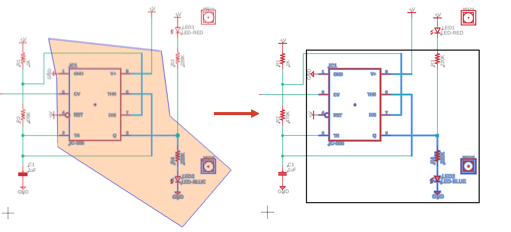
Figure 1: Polygon selection and the selected objects within a rectangle.
The selection includes:
- all objects whose origin is inside the polygon
- all wires with at least one end point inside the polygon
- all circles whose center is inside the polygon
- all rectangles with any corner inside the polygon
If you want a more permanent group, use the New Group tool in the contextual menu. The group is marked with a bounding box and a label at the top.
Progressive selection
Progressive selection is a selection method that expands or shrinks your current selection to include connected lines in a chain. This lets you quickly select entire traces, nets, or polygons without manually clicking each segment.
Progressive selection works with these elements:
- Traces in layout: Select connected trace segments across layers and through vias.
- Nets in schematic: Select connected net segments through junctions and components.
- Polygon edges in layout: Select entire polygons or all polygons on specific layers.
- Polygon edges in schematic: Select entire polygons or all polygons in a sheet.
Use Shift+Right Arrow to expand and Shift+Left Arrow to shrink the selection. You can also hold Shift and click a selected line to expand. This method only expands; it doesn't shrink.