Control hub invitation approvals
As a hub admin, you can control what happens when new hub members are invited by configuring invitation settings in the Hub Settings tab.
Navigate to the hub with the Fusion web client.
Click your profile
 in the upper right of the page.
Click Admin.
Click the Hub Settings tab.
In the Access section, configure invitation settings.
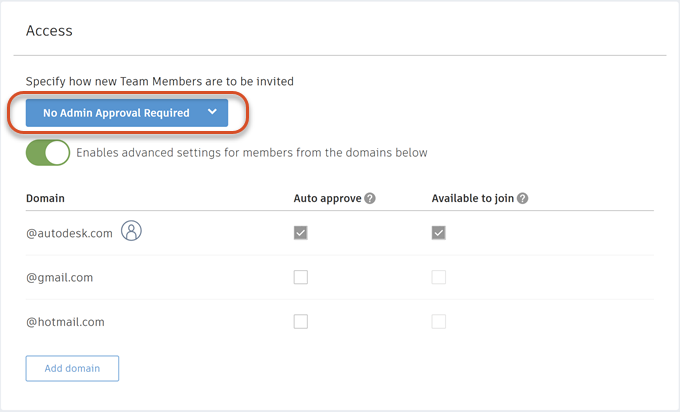
Options include:
Admin invite only. Only an administrator may invite new hub members.
Admin approval required. Any member may invite a new hub member, but the new member must be approved by the administrator.
No admin approval required. New members may be invited to the hub by existing members without the administrator's approval.
(Optional) Under Enables advanced settings for members from the domains below, control how to accept hub membership from specific domains.
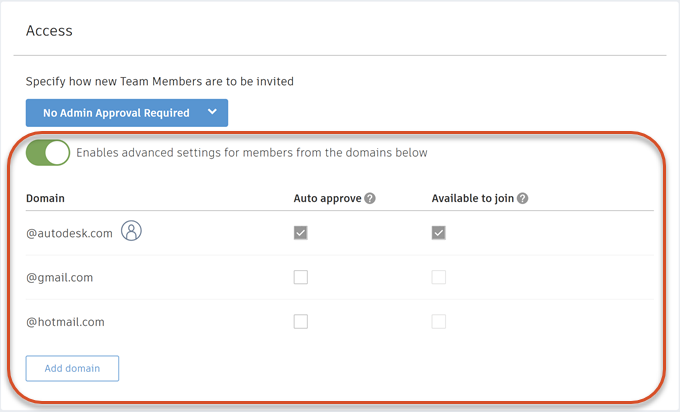
For each domain, these behaviors can be enabled:
Auto approve: When anyone from the domain is invited, they are automatically added to the current hub.
Available to join: When anyone from the domain is viewing a list of hubs available to join, the current hub will appear in the list.