Edit group details
Hub admins can edit group details in the Groups page.
On the Groups page, click the group you want to edit.
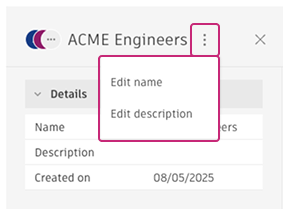
A side panel with the group's details opens.
Click More
 in the panel header.
Choose Edit name or Edit description.
Make your changes directly in the editable field.
Press Enter to save your changes.
Changes to group names and descriptions take effect immediately.
Note: You can't delete groups at this time. To make changes, you can rename or repurpose a group, or update its members.