Search and filter hub members
As a hub admin, you can use the search and filter tools to quickly find and organize members when managing large teams.
Search for a hub member
In the Fusion web client, click your profile image in the top-right corner.
Click Admin > Members.
In the Members tab, type the member's name in the search field.
As you type, the member list automatically filters to show matching results.
Click a member to view or manage their profile. To clear your search and return to the full member list, delete the text in the search field or click X.
Filter members by status
In the Members tab, click the filter icon
 in the top-right corner of the member list.
Select a status filter.
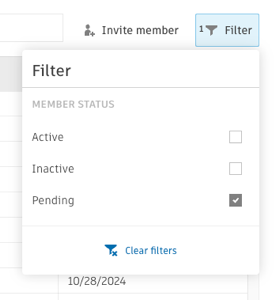 Note: Only one status can be selected at a time.
The member list updates automatically to show only members matching your selected status. To clear filters, click the filter icon again and select Clear filters or manually deselect the filter.