Finish a sketch with AutoConstrain
Finish an active sketch and apply constraints and dimensions automatically in Fusion.
Create a sketch and add sketch geometry, or activate an existing sketch with sketch geometry.
Add some initial constraints and dimensions to your sketch for best results.
On the toolbar, open the Finish Sketch menu
 , then select Finish with AutoConstrain.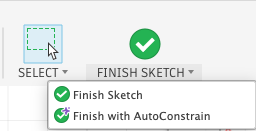
Fusion finishes the sketch and applies constraints and dimensions automatically. Constraining your sketch... displays while the tool runs.
Optional: Click Cancel to finish the sketch without applying AutoConstrain.
The sketch closes and you return to the Design workspace. Constraints and dimensions from AutoConstrain display on the finished sketch.
Tips
- To compare result options before you apply constraints, use Automatically constrain and dimension your sketch instead.
- To revert the action, select Undo Finish with AutoConstrain from the undo menu.
Limitations
Finish with AutoConstrain is not available when:
- You use Fusion for personal use.
- The sketch has 0 entities.
- The sketch has more than 250 entities.
- You are offline. AutoConstrain requires an internet connection.
- The sketch is a 3D sketch. AutoConstrain works with 2D sketches only.
If AutoConstrain cannot complete, the sketch still finishes and a notification displays that constraints and dimensions were not applied.