Conditional logic and the If node
The If node implements conditional logic in a graph. It evaluates a Boolean condition and sends the graph down one of two branches based on the result.
If node
The If node has three input ports and one output port:
- Condition: A Boolean input (
trueorfalse) that determines which branch runs - True Value: The branch that runs when Condition is
true - False Value: The branch that runs when Condition is
false - Result (output): the value produced by the taken branch
Example
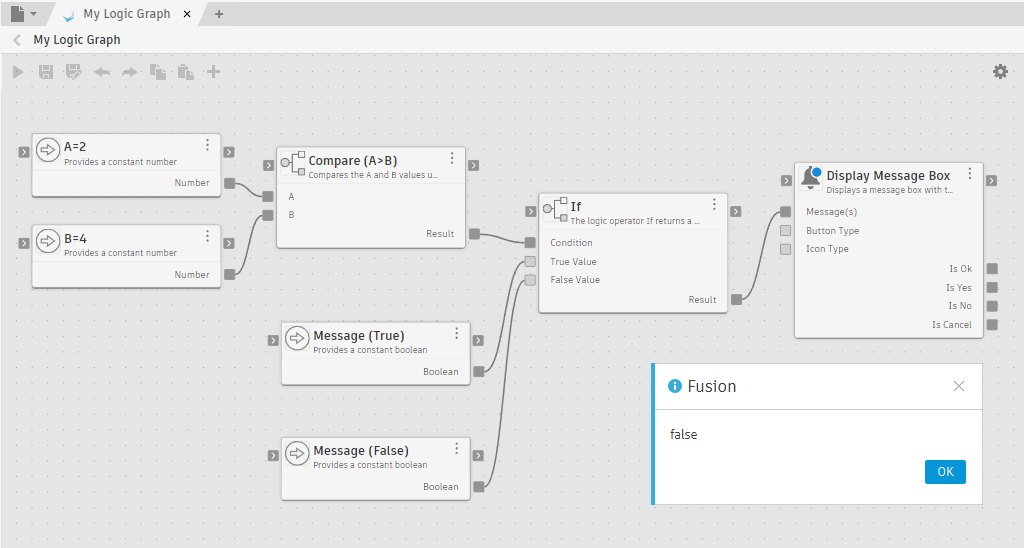
Because A (2) is less than B (4), the Compare node returns false. The If node routes to the False Value branch and the dialog confirms it. The True Value branch never runs.
Only the branch that matches the condition is evaluated. The entire upstream chain connected to the other branch never runs, so those nodes are skipped entirely. You can safely wire expensive or side-effecting operations into one branch without those operations triggering when the other branch is taken.
A common pattern is to pair the If node with the Is Input Valid node. Is Input Valid checks whether a list is empty or a value is null, and returns a Boolean. Passing that Boolean into the If node's Condition port lets the graph handle missing or empty data gracefully.
Flow and branching
In a data-driven graph, some nodes don't expose a data output that can connect to the True Value or False Value port of an If node. In those cases, the Repeat node acts as a bridge: wire an upstream flow port into the Repeat node's flow port, then connect the Repeat node's output to the If node's port. See Use the Repeat node for details.