Create a reusable subgraph
A reusable subgraph is a standalone graph file that you can include as a node in other graphs. Enable boundary nodes on a graph to make it reusable, then add it to any graph in the same package. See Reusable subgraphs for an overview.
The graph you want to make reusable must belong to an editable (user) package. Read-only packages shipped with System Modeler can't be modified.
Enable boundary nodes
Open the graph you want to make reusable in the graph editor.
Click an empty area of the canvas to deselect all nodes.
The Graph tab becomes active in the Details panel.
Under Properties, turn on the Boundary nodes toggle.
The Input and Output nodes appear on the canvas.
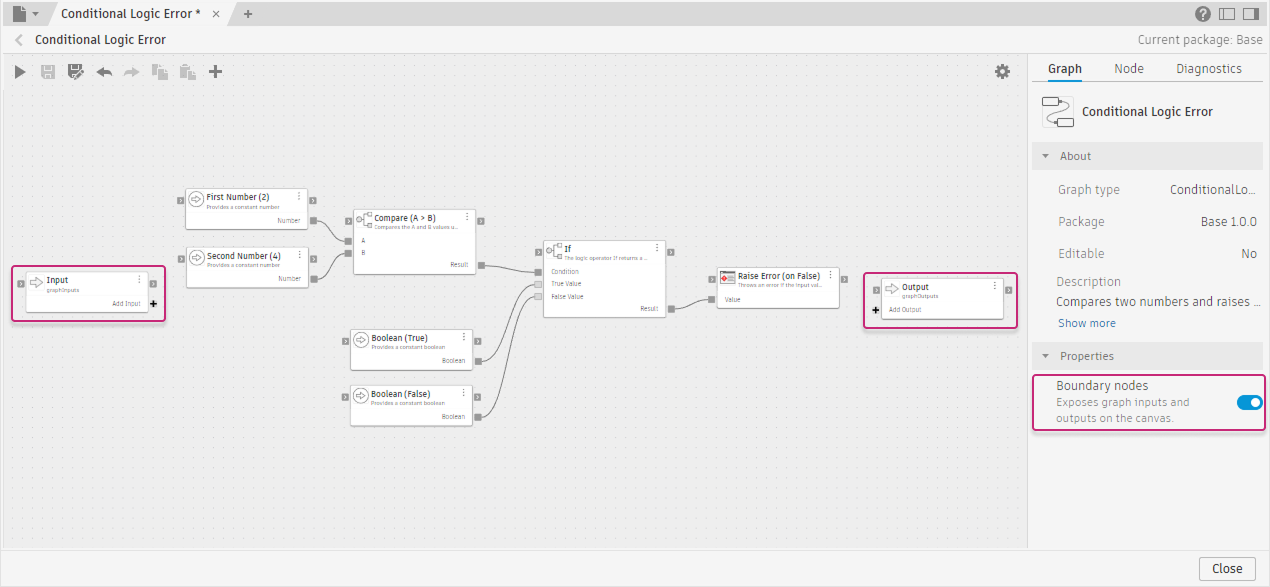
Base - Conditional Logic Error
Define the interface
Add input ports to define what values a parent graph can pass in. Add output ports to define what values the graph returns.
- Add an input port: Drag a wire from an upstream node's output to the Add Input port on the Input node. A new port appears, named after the connected output.
- Add an output port: Drag a wire from a node's output to the Add Output port on the Output node. A new port appears, named after the connected output.
- Rename a port: Use either method:
- Place the pointer over the port label until More
 appears, click it, and select Rename.
 - Select the Input or Output node, open the Graph tab, and edit the Port name box in the Ports section.
- Place the pointer over the port label until More
- Remove a port: Use either method:
- Place the pointer over the port label until More appears, click it, and select Remove.
- Select the Input or Output node, open the Graph tab, and click the trash icon next to the port.
- Place the pointer over the port label until More
Save the graph
Press Ctrl+S (Windows) / Command+S (macOS) to save the graph. The graph is now available as a reusable reference.
Use the reusable subgraph in another graph
Open the parent graph in the graph editor.
In the Library panel, expand the package that owns the reusable subgraph.
Expand the Graphs category inside the package. Reusable subgraphs are listed there, separate from nodes.
Left-click the graph to insert it at the center of the canvas, or drag it to a specific position.
It appears as a node with the input and output ports you defined.
Wire values into its input ports and connect its output ports to downstream nodes.
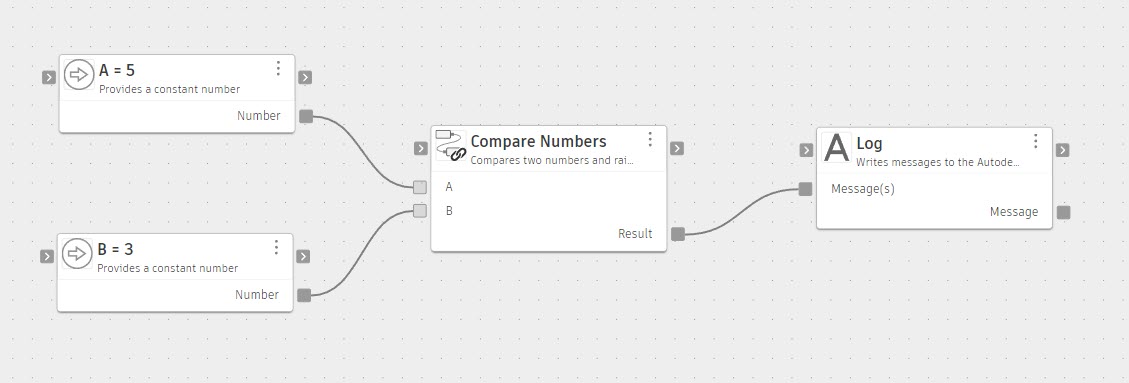
Compare Numbers (copy of Base - Conditional Logic Error)
Result
The reusable subgraph node behaves like any other node. Editing and saving the source graph updates every graph that uses it. You can also run the reusable subgraph on its own as a standalone graph to test it in isolation.