Reusable subgraphs
Both reusable subgraphs and embedded subgraphs encapsulate logic and expose it as a node in a parent graph. The key difference is scope:
- An embedded subgraph exists only inside its parent graph file and can't be used independently.
- A reusable subgraph is a standalone
.graph.jsonfile that any graph in the same package can include as a node. The same file can be used in multiple parent graphs without duplicating its contents. Editing it updates every graph that uses it, including graphs in other packages if the package has been shared or exported.
Use embedded subgraphs for logic specific to one graph. Use reusable subgraphs for logic you want to share and maintain in one place across multiple graphs.
Boundary nodes
Enable Boundary nodes in the Graph tab of the Details panel under Properties. When enabled, the graph exposes its input and output ports so a parent graph can wire values into and out of it. Internally, the graph is loaded as a graph reference (a pointer to the standalone file rather than a copy of its contents). See Details panel for details on the Boundary nodes property.
Example
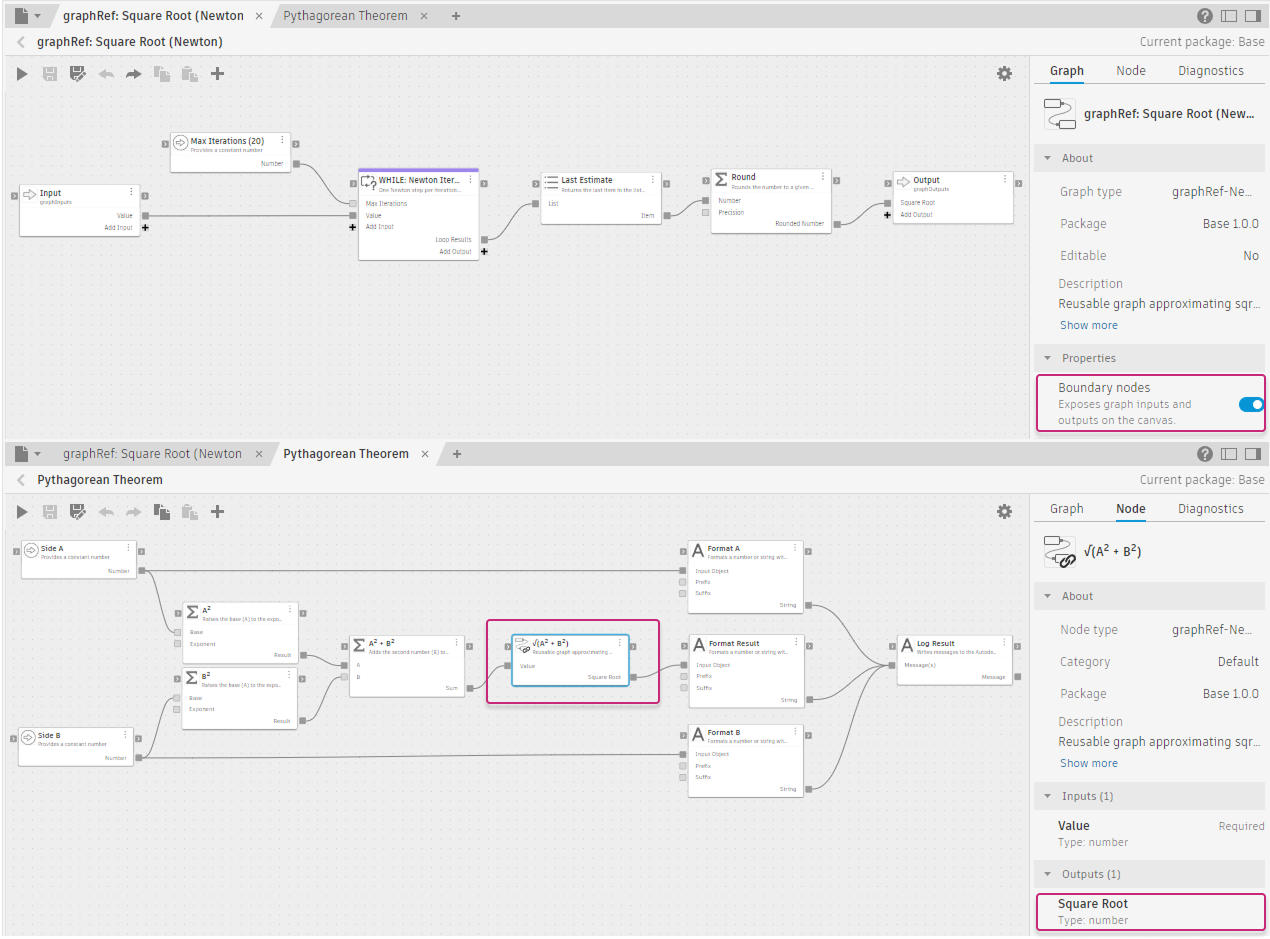
Base - Subgraph: Square Root (Newton) (top) and Pythagorean Theorem (bottom)
The Square Root graph has Boundary nodes enabled, which exposes its Value input to any parent graph that references it. In the Pythagorean Theorem graph, the entire Square Root logic is encapsulated in the single √(A² + B²) reference node.
A reusable subgraph can also be run as a standalone graph, even when Boundary nodes is enabled. Running it directly is useful for developing and testing in isolation before using it in a parent graph. When run standalone, no parent graph supplies values to the input ports, so those inputs receive null or zero. The graph must handle this case explicitly. Guard inputs with an Is Input Valid node and route to fallback values when no input is provided. See Design reusable subgraphs for patterns.